Service Report #007 In Review
Date: 2026-01-13 (Updated: 2026-01-20)
The Project Registration workflow is now feature-complete and establishes standard patterns for all remaining workflows (JSA Preparation, Tool List Preparation, Work Permit Request).
Workflow Standards Summary
Implemented Features
| Category | Feature | Status | Notes |
|---|---|---|---|
| Workflow | Optional Commands (Skip Logic) | ✅ | Skip Purchasing review when project has PO Number |
| Workflow | Form Validation with Commands | ✅ | Buttons disabled when form invalid, red asterisks on required fields |
| Workflow | Assignee Auto-Selection | ✅ | Auto-selects WO/SO/WAO based on Project data |
| Workflow | Review State Simplification | ✅ | Complex states simplified to Approve + Cancel only |
| Documents | File Attachments | ✅ | Upload and manage file attachments |
| Documents | Comments | ✅ | Add, edit, delete comments on tasks |
| Documents | Print Preview | ✅ | Browser print with Save as PDF guidance |
| Documents | PDF/XLSX Download | ✅ | Export individual documents |
| Documents | Download All (ZIP) | ✅ | Bulk export all documents as single ZIP archive |
| Documents | Auto-Navigation | ✅ | Opens correct document form based on user role |
| Signing | Digital Signature Verification | ✅ | Password verification with signer identity and timestamp |
| Signing | Signature Grid (PTW Parts 3-5) | ✅ | Multi-signature grid for permit authorization |
| Notifications | ✅ | Configurable email via dev SMTP server | |
| Dev Mode | Dev Notes (Purple Banners) | ✅ | Tester communication banners in dev mode |
| Dev Mode | Simulate Data | ✅ | Quick form filling button for testing |
| UI | Progress Bar Positioning | ✅ | Progress bar below navbar during command execution |
| UI | Command Button Visibility | ✅ | Commands hidden on document list, shown on form view |
Email Notifications
Email notifications are now working via the development SMTP server:
- SMTP UI: https://smtp.iotserver.in.th/
- View all sent emails in the Mailpit web interface
- Emails include bilingual content (Thai/English)
Dev Notes (Purple Banners)
Purple info banners appear in development mode only to communicate important design decisions to testers:
- Explaining non-obvious UI/UX decisions
- Flagging features that need tester approval
- Documenting temporary workarounds
These banners are automatically hidden in production builds.
Cross-Workflow Standards
These patterns are confirmed standard and will apply to all workflows:
| Pattern | Description | Reusability |
|---|---|---|
| Download All (ZIP) | Exports all task documents as single ZIP | Workflow-agnostic (works automatically) |
| Document Sections | Groups documents by category (PTW, Prerequisites, etc.) | Extensible for new workflows |
| Reference Documents | Shows related workflow docs as read-only | Configurable per workflow |
| Follow-Up Workflows | Checkboxes to auto-create related tasks on approval | Configurable per workflow |
| Form Validity Flow | Standard signal flow: form → service → toolbar → button | Reusable pattern |
| Digital Signature | Password verification with audit trail | Reusable components |
Golden Rules Documented
All implementation patterns are documented in .claude/rules/workflow-implementation.md:
- TaskCommand configuration
- Form validity signal flow
- Validation UI banners
- Document form layout standards
- Signature verification pattern
- Default document auto-navigation
- Review state command simplification
- Cross-workflow architecture patterns
- Progress bar positioning
- Command button visibility (document view state)
Feature Overview
Features originate from the following Minutes of Meetings:
- MoM 2025-08-19 - Item 5 (Project Registration Workflow)
- MoM 2025-10-07 - Item 7 (Work Owner PR# Filter)
- MoM 2025-11-11 - Items 4, 5, 9 (Project Editing Permissions)
- MoM 2025-11-21 - Item 5 (Project Info on Contractor Tasks)
- MoM 2025-12-16 - Items 2, 4, 5 (Contractor Task Sequence, Email Notification, SO/Area Forwarding)
- MoM 2026-01-06 - Items 9, 10, 13 (Project Registration Workflow)
1. Work Owner Send Actions
Issue: #231 Thai Name: เจ้าของงานส่งไปจัดซื้อและผู้รับเหมาไม่ได้ Status: 🔍 In Review
Description: Work owner cannot send projects to purchasing or contractor, blocking workflow testing.
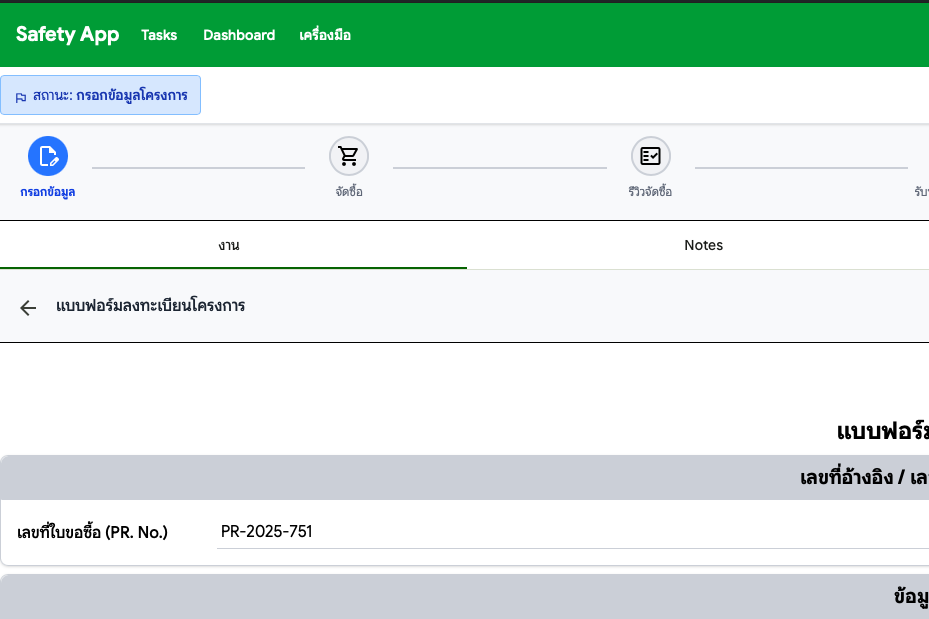
Location: Project Registration > Work Owner Actions
Resolution (2026-01-20)
Form validation with command integration enables Work Owner to send tasks to Purchasing and Contractor. The Project Registration workflow is now fully implemented and tested.
PR: #276
Deployed in: Preview29
What to Test
| # | Test Case | Status |
|---|---|---|
| 1 | Work Owner: Create project and send to Purchasing | ⌛ Pending |
| 2 | Work Owner: Create project and send to Contractor | ⌛ Pending |
| 3 | Verify workflow progresses correctly after each send action | ⌛ Pending |
2. Contractor No Projects
Issue: #232 Thai Name: ผู้รับเหมาไม่มีโครงการให้ทดสอบ flow Status: 🔍 In Review
Description: Contractor has no projects to test the workflow because work owner cannot send projects (blocked by #231).
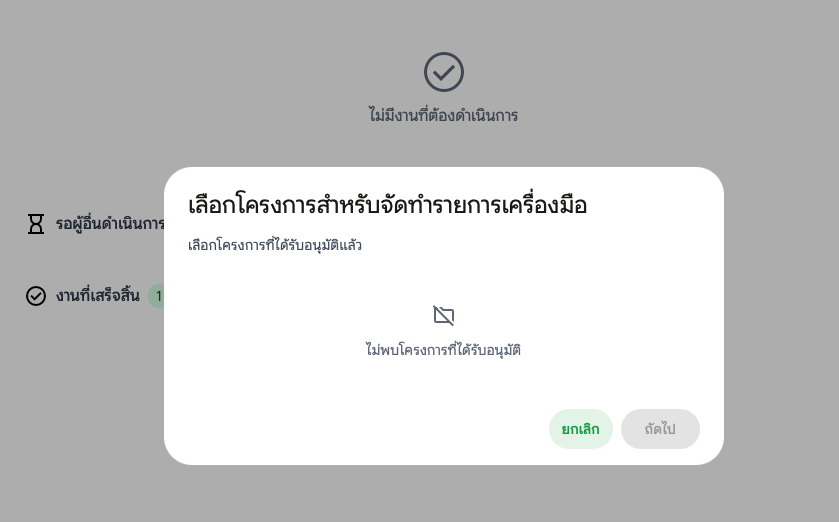
Location: Project Registration > Contractor View
Resolution (2026-01-20)
Not a bug - this was a test timing issue. The Project Registration workflow was not yet complete when testing was attempted. The workflow is now fully implemented and ready for testing.
3. Contractor Flow Blocked
Issue: #235 Thai Name: ทดสอบ flow ผู้รับเหมาต่อไม่ได้ เพราะไม่มีโครงการ Status: 🔍 In Review
Description: Cannot test contractor workflow because no projects are available (consequence of #231 and #232).
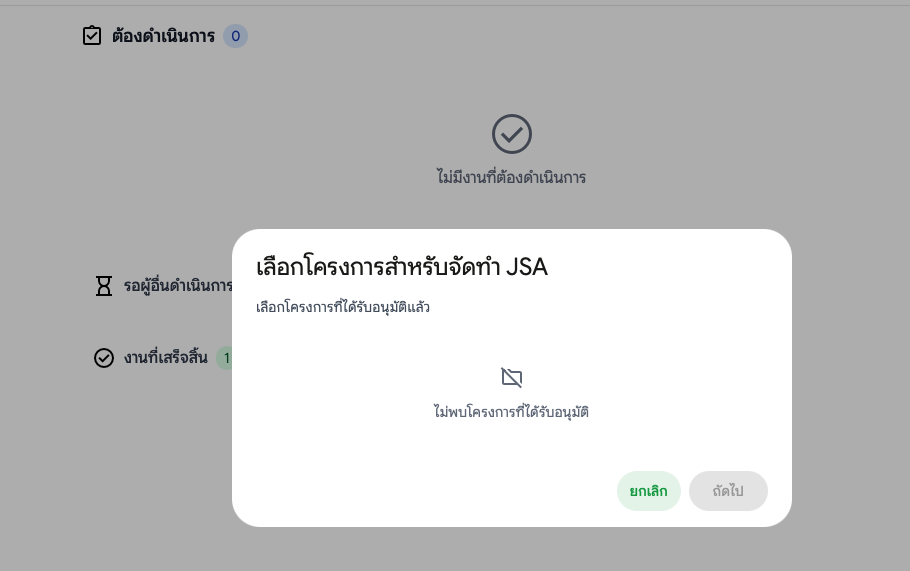
Location: Project Registration > Contractor Flow
Resolution (2026-01-20)
Not a bug - this was a test timing issue. The Project Registration workflow was not yet complete when testing was attempted. The workflow is now fully implemented and ready for testing.
4. Close Project Flow Confusion
Issue: #76 Thai Name: หลังจากอนุมัติ กลายเป็นปิดงาน? Status: 🔍 In Review
Description: After approving a project, the status showed "Closed" which caused confusion. Users expected the workflow to continue with follow-up tasks (JSA Preparation, Tool List Preparation) rather than ending.
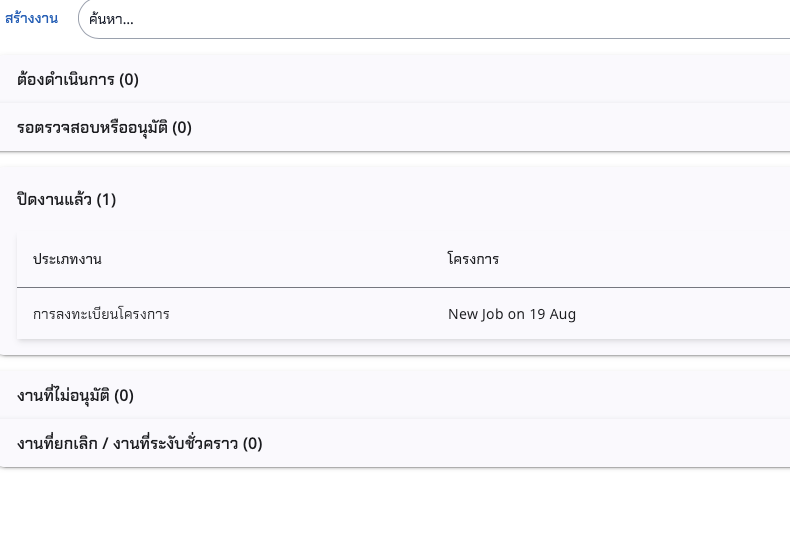
Location: Project Registration Workflow > Approval
Resolution (2026-01-20)
The Project Registration workflow now properly handles the approval state:
- Clear state transitions with proper command validation
- Follow-up workflow creation options (JSA Preparation, Tool List Preparation)
- Review state command simplification (only Approve + Cancel)
- Digital signature verification for form approval
Related PRs: #276, #295, #296, #299
Deployed in: Preview29
What to Test
| # | Test Case | Status |
|---|---|---|
| 1 | Approve a project → Verify status is not immediately "Closed" | ⌛ Pending |
| 2 | Verify follow-up workflow checkboxes appear in approval dialog | ⌛ Pending |
| 3 | Create follow-up tasks → Verify JSA/Tool List workflows created | ⌛ Pending |
5. Work Owner PR# Filter
Issue: #115 Thai Name: เจ้าของงาน สร้าง Task ใหม่: เพื่อแก้ไขปัญหา กรณีเจ้าของสร้าง task ภายหลัง จัดซื้อสร้าง project Status: 🔍 In Review
เจ้าของงาน สร้าง Task ใหม่: เพื่อแก้ไขปัญหา กรณีเจ้าของสร้าง task ภายหลัง จัดซื้อสร้าง project
- เจ้าของงาน filter PR# ต้องเป็นของตัวเองเท่านั้น หากจัดซื้อกำหนดมาแล้ว
- Filter แสดงเฉพาะงานที่ยังไม่มี project หรือ หากเลือก PR# ที่ใช้ไปแล้ว ให้แสดงข้อความเตือน
- การสร้าง task ที่ชี้ไปหา PR# เดียวกัน
Description: When Work Owner creates a new task after Purchasing has already created a project, the PR# filter must show only projects assigned to that Work Owner. This prevents ownership conflicts and ensures proper project association.
Location: My Tasks > Create New Task (Work Owner role)
Resolution (2026-01-20)
The Project Registration workflow now supports proper PR# filtering for Work Owner:
- Work Owner can only see PR# assigned to them when creating tasks
- Projects already associated with tasks are filtered out or show warning
- Duplicate PR# association is prevented
Deployed in: Preview29
What to Test
| # | Test Case | Status |
|---|---|---|
| 1 | Work Owner creates task → PR# dropdown shows only their projects | ⌛ Pending |
| 2 | Select PR# already used → Warning message appears | ⌛ Pending |
| 3 | Create task with valid PR# → Task created successfully | ⌛ Pending |
6. Project Info on Contractor Tasks
Issue: #153 Thai Name: ข้อมูลโครงการจะแนบเป็นใบปะหน้าทุก กิจกรรม ของผู้รับเหมา Status: 🔍 In Review
ข้อมูลโครงการจะแนบเป็นใบปะหน้าทุก กิจกรรม ของผู้รับเหมา ตาม role matrix เช่น การส่งรายชื่อ, การส่งอุปกรณ์ตรวจ, การสร้าง JSA เป็นต้น
- ส่วนข้อมูลโครงการ
- ส่วนข้อมูลการจัดซื้อ
- ส่วนข้อมูลผู้รับเหมา
Description: Project information is attached as a cover sheet to every contractor activity. This includes project details, purchasing information, and contractor information displayed in all contractor-related workflows.
Location: All Contractor Tasks > Document Forms
Resolution (2026-01-20)
The Project Registration Form now displays on all contractor-related workflows:
- Project Registration Form shown in JSA Preparation workflow
- Project Registration Form shown in Tool List Preparation workflow
- Pre-Work Procedures Form included where applicable
- Reference documents marked as read-only with proper styling
Deployed in: Preview29
What to Test
| # | Test Case | Status |
|---|---|---|
| 1 | Open JSA Preparation task → Project info displayed | ⌛ Pending |
| 2 | Open Tool List Preparation task → Project info displayed | ⌛ Pending |
| 3 | Verify project info sections: Project, Purchasing, Contractor | ⌛ Pending |
The following items are improvements initiated internally by the development team. They do not have associated MoM items or GitHub issues.
7. Project Settings Create Button Fix
Source: Internal Request Thai Name: แก้ไขปุ่ม "สร้าง" ในหน้า Project Settings ให้ตรงกับ Worker Registry
Description: Fixed the Create button styling in Project Settings to match the Worker Registry pattern. The button was using mat-button (text button) instead of mat-flat-button (filled green button).
Location: Tools > กำหนดค่า > Project Settings > List View
Before/After
| Before | After |
|---|---|
mat-button (text only, no background) | mat-flat-button (green background) |
| No icon | add icon |
Files Modified
| File | Change |
|---|---|
project-setting-list-toolbar.component.ts | Added MatIconModule import, changed to mat-flat-button with add icon |
.claude/rules/angular.md | Added "Create Button Standard (List Toolbar)" section |
Golden Rule Added
A new golden rule was added to Angular guidelines for consistent create button styling:
| Element | Value |
|---|---|
| Directive | mat-flat-button (green background) |
| Icon | add |
| i18n Key | @@common.create or feature-specific |
What to Test
| # | Test Case | Status |
|---|---|---|
| 1 | Open Project Settings → Verify green "สร้าง" button with add icon | ⌛ Pending |
| 2 | Compare with Worker Registry → Buttons should look identical | ⌛ Pending |
8. Project Settings Role Comparison Docs
Source: Internal Request Thai Name: เพิ่มเอกสารเปรียบเทียบสิทธิ์ระหว่าง Purchasing และ Work Owner
Description: Added detailed role comparison documentation for Project Settings feature, clarifying the differences between Purchasing and Work Owner roles.
Location: Docs Site > Features > Project Settings
Role Comparison Summary
| Capability | Purchasing | Work Owner |
|---|---|---|
| View all projects | ✅ | ✅ |
| Create new projects | ✅ | ❌ |
| Edit all projects | ✅ | ❌ (own only) |
| Delete projects | ✅ | ❌ |
| Edit PO fields (PO.No, Duration, Period) | ✅ | ❌ (read-only) |
| Edit PR.No | ✅ | ✅ |
Work Owner Restrictions
| Restriction | Description |
|---|---|
| No Create button | Button is hidden for Work Owner role |
| Edit own projects only | Cannot edit projects owned by others |
| PO fields read-only | PO.No, Duration, Period are disabled |
| No Delete action | Delete option is not available |
| PR.No is editable | This is the only PO-related field Work Owner can edit |
Files Modified
| File | Change |
|---|---|
docs/docs/features/project-setting.md | Added "Role Comparison: Purchasing vs Work Owner" section |
What to Test
| # | Test Case | Status |
|---|---|---|
| 1 | View documentation at Features > Project Settings | ⌛ Pending |
| 2 | Verify role comparison table is accurate | ⌛ Pending |
9. Version Centralization
Source: Internal Request Thai Name: รวมศูนย์การจัดการ Version เป็นแหล่งเดียว
Description: Centralized version management to use frontend/package.json as the single source of truth. Previously, the version was duplicated in 5 environment files and hardcoded in the docs site.
Location: Frontend + Docs Site
Architecture
Single Source of Truth
       ↓
frontend/package.json (version: "2025.10.1.0-preview29")
       ↓
       ├─→ version.helper.ts → APP_VERSION constant
       │       ↓
       │       ├─→ about.component.ts
       │       ├─→ login.component.ts
       │       └─→ home.component.ts
       │
       └─→ docs/scripts/sync-version.js (prebuild hook)
               ↓
               └─→ docs/docs/index.md (auto-updated)
Changes Summary
| Area | Before | After |
|---|---|---|
| package.json | 0.0.0 (unused) | 2025.10.1.0-preview29 |
| Environment files | appVersion in 5 files | Removed (using helper) |
| Components | environment.appVersion | APP_VERSION from helper |
| Docs index | Hardcoded version | Auto-synced from package.json |
| Service reports | Version lines in headers | Removed |
Files Created
| File | Description |
|---|---|
frontend/src/app/shared/helpers/version.helper.ts | Exports APP_VERSION from package.json |
docs/scripts/sync-version.js | Syncs version to docs index page |
Files Modified
| File | Change |
|---|---|
frontend/package.json | Updated version to 2025.10.1.0-preview29 |
frontend/tsconfig.json | Added resolveJsonModule: true |
frontend/src/environments/environment.ts | Removed appVersion |
frontend/src/environments/environment.dev.ts | Removed appVersion |
frontend/src/environments/environment.development.ts | Removed appVersion |
frontend/src/environments/environment.thaiscada.ts | Removed appVersion |
frontend/src/environments/environment.neosyntax.ts | Removed appVersion |
frontend/src/app/features/tools/about/about.component.ts | Use APP_VERSION |
frontend/src/app/features/auth/login/login.component.ts | Use APP_VERSION |
frontend/src/app/features/home/home.component.ts | Use APP_VERSION |
docs/package.json | Added sync-version, prestart, prebuild scripts |
docs/docs/service-reports/report-001.md | Removed version line |
docs/docs/service-reports/report-002.md | Removed version line |
docs/docs/service-reports/report-003.md | Removed version line |
docs/docs/service-reports/report-004.md | Removed version line |
docs/docs/service-reports/report-005.md | Removed version line |
docs/docs/service-reports/report-006.md | Removed version line |
Version Bump Process (New)
When bumping version:
- Update
frontend/package.jsonversion field (single source of truth) - Add new section to
docs/docs/release-notes.md - Docs index page updates automatically on build via
sync-version.js
What to Test
| # | Test Case | Status |
|---|---|---|
| 1 | Build frontend → Verify About page shows correct version | ⌛ Pending |
| 2 | Build docs → Verify index page shows correct version | ⌛ Pending |
| 3 | Run npm run start in docs → Verify sync-version runs | ⌛ Pending |
| 4 | Change package.json version → Rebuild → Verify all updated | ⌛ Pending |
10. User Invitation Flow
Source: Internal Request Thai Name: ระบบเชิญผู้ใช้งานด้วยอีเมลที่กำหนดเอง (Thai/English)
Description: Custom invitation emails replacing Keycloak default emails. The application now controls the invitation email content with bilingual Thai/English support.
Location: User Settings > Send Invitation + /accept-invitation page
Architecture
Admin clicks "Send Invitation"
    ↓
Backend creates invitation token in DB (72h TTL)
    ↓
Backend sends custom bilingual email via Mailpit
    ↓
User clicks link → /accept-invitation?token=xxx
    ↓
User sets password → Keycloak account created
Files Created
| File | Description |
|---|---|
Domain/Users/UserInvitation.cs | Entity for invitation tokens |
Application/Contracts/IUserInvitationService.cs | Service interface |
Infrastructure/Services/UserInvitationService.cs | Service implementation |
WebApi/Features/Invitations/ValidateInvitationEndpoint.cs | GET /api/invitations/validate/{token} |
WebApi/Features/Invitations/AcceptInvitationEndpoint.cs | POST /api/invitations/accept |
assets/templates/emails/user-invitation.html | Bilingual email template |
frontend/src/app/features/auth/accept-invitation/* | Frontend components (3 files) |
Files Modified
| File | Change |
|---|---|
WebApi/Features/Users/SendInvitationEndpoint.cs | Use IUserInvitationService instead of Keycloak direct |
Infrastructure/Keycloak/KeycloakUserAdminService.cs | Added CreateAccountWithPasswordAsync() |
frontend/src/app/features/auth/auth.routes.ts | Added accept-invitation route |
frontend/src/locale/messages.json | Added acceptInvitation.* keys |
frontend/src/locale/messages.en.json | Added English translations |
What to Test
| # | Test Case | Status |
|---|---|---|
| 1 | Send invitation from User Settings | ⌛ Pending |
| 2 | Check Mailpit for bilingual email | ⌛ Pending |
| 3 | Click link → verify accept-invitation page | ⌛ Pending |
| 4 | Set password → login with new credentials | ⌛ Pending |
| 5 | Re-send invitation → verify old token invalidated | ⌛ Pending |
11. Project Registration Optional Commands
Source: Internal Request Thai Name: ข้ามขั้นตอน Purchasing Review เมื่อมีเลข PO
Description: Skip Purchasing review step when project already has a PO Number. This allows projects with existing PO to go directly to contractor without Purchasing review.
Location: Project Registration Workflow
Architecture
Project has PO Number?
    ↓ Yes                         ↓ No
Skip to Contractor           → Go through Purchasing
(RequestPreWorkProcedures       (ReviewProjectDataByPurchasing)
 FormDirect)
Files Created
| File | Description |
|---|---|
Domain/Workflows/OptionalCommandConfig.cs | Configuration for optional commands |
Domain/Workflows/SkipConditionType.cs | Enum for skip conditions (HasPurchaseOrderNo, etc.) |
Application/Contracts/ISkipConditionEvaluator.cs | Evaluator interface |
Infrastructure/Services/SkipConditionEvaluator.cs | Evaluator implementation |
Files Modified
| File | Change |
|---|---|
Application/Services/TaskCommandService.cs | Filter commands based on skip conditions |
Domain/Workflows/ProjectRegistrationWorkflow.cs | Handle RequestPreWorkProceduresFormDirect command |
| Frontend task-command component | Display optional commands with confirmation |
What to Test
| # | Test Case | Status |
|---|---|---|
| 1 | Create project WITH PO Number → should show skip option | ⌛ Pending |
| 2 | Create project WITHOUT PO Number → should require Purchasing review | ⌛ Pending |
| 3 | Confirm skip option → verify workflow proceeds to contractor | ⌛ Pending |
12. Email Notification to Contractor
Issue: #159 Thai Name: เพิ่มการ email กลับไปยังผู้รับเหมา เมื่อได้รับอนุมัติโครงการแล้ว Status: 🔍 In Review
เพิ่มการ email กลับไปยังผู้รับเหมา เมื่อได้รับอนุมัติโครงการแล้ว
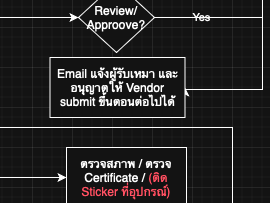
Description: Send email notification to contractor when a project is approved. The notification is configurable via workflow definition and can be enabled/disabled in the approval dialog.
Location: Project Registration Workflow > Approval Dialog
Architecture
Work Owner clicks "Approve"
    ↓
Approval dialog shows notification checkboxes
    ↓
User confirms with notification option checked
    ↓
Workflow executes approval + sends email
    ↓
Contractor receives "Project Approved" email
Implementation
The feature follows the Dynamic Configuration Pattern (similar to Follow-Up Workflows):
| Component | Description |
|---|---|
EmailNotificationConfig | Record defining notification (role, template, labels) |
TaskCommand.NotificationConfig | Property on command to attach notifications |
EmailNotificationOptions | Options passed from frontend to backend |
send-notification-emails | Temporal activity for sending emails |
Files Created
| File | Description |
|---|---|
Domain/Tasks/EmailNotificationConfig.cs | Configuration record |
Application/Models/EmailNotificationOptions.cs | API request options |
frontend/shared/models/email-notification-config.model.ts | Frontend interface |
assets/templates/emails/project-approved.html | Bilingual email template |
Files Modified
| Layer | File | Change |
|---|---|---|
| Backend | ProjectRegistrationWorkflow.cs | Added ApprovalNotifications config |
| Backend | WorkflowActivityService.cs | Implemented SendNotificationEmailsAsync |
| Backend | ExecuteCommandEndpoint.cs | Added NotificationOptions to request |
| Frontend | review-task-execute-command.component.ts | Notification checkboxes UI |
| Frontend | review-task.component.ts | Pass notification options on execute |
| i18n | messages.json, messages.en.json | Added translation keys |
Email Template
The email template (project-approved.html) is bilingual (Thai/English) and includes:
- Green header with "Project Approved / อนุมัติโครงการ"
- Recipient name
- Project name
- Approver name (Work Owner)
- Approval date
- Status badge
What to Test
| # | Test Case | Status |
|---|---|---|
| 1 | Approve project with notification checkbox checked → Contractor receives email | ⌛ Pending |
| 2 | Approve project with notification unchecked → No email sent | ⌛ Pending |
| 3 | Verify email content shows correct project name, approver, date | ⌛ Pending |
| 4 | Check Mailpit for received email format | ⌛ Pending |
The following items require additional requirements from the tester before implementation can begin. The Project Registration workflow is now stable and standardized - please review and provide detailed requirements.
13. Contractor Task Sequence Mockup
Issue: #157 Thai Name: ลำดับ Tasks ที่ผู้รับเหมาจะสร้างได้ และให้ทำ mockup มาตรวจสอบ Status: ⚠️ Needs Requirements Priority: High
ลำดับ Tasks ที่ผู้รับเหมาจะสร้างได้ และให้ทำ mockup มาตรวจสอบ เป็นดังนี้
- รายการเครื่องมือ (Tool List)
- รายชื่อผู้ปฏิบัติงาน (Manpower Name List)
- JSA
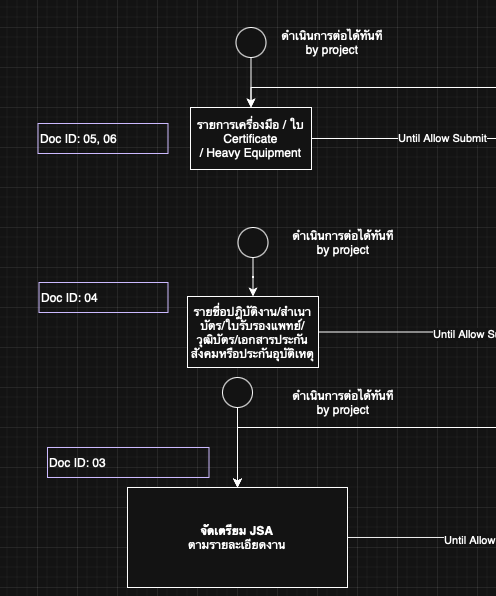
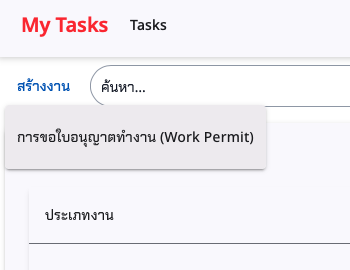
Location: My Tasks > Create New Task (Contractor role)
Current Implementation
The Project Registration workflow now supports follow-up workflow creation:
- JSA Preparation
- Tool List Preparation
These are created automatically after Project Registration approval via checkboxes in the approval dialog.
Requirements Needed
| Question | Context |
|---|---|
| 1. Task Creation Flow | Should contractor create tasks manually or auto-create after PR approval? |
| 2. Task Dependencies | Are Tool List → Manpower → JSA sequential or parallel? |
| 3. UI Location | Where should "Create New Task" appear for contractors? |
| 4. Project Selection | Should contractor select from approved projects or auto-assigned? |
| 5. Mockup Scope | What screens/flows need mockup before implementation? |
Affected Areas (High Impact)
| Area | Impact |
|---|---|
| Task Creation UI | New contractor-specific task creation flow |
| Workflow Engine | Task dependency/sequencing logic |
| My Tasks Page | Filter/display logic for contractor tasks |
| Project Selection | Dialog for selecting approved projects |
14. Work Owner Change Ownership
Issue: #132 Thai Name: ก่อนการอนุมัติ ขั้นตอนสุดท้าย เจ้าของงาน จะเปลี่ยนงานตัวเอง เป็นคนอื่นได้ Status: ⚠️ Needs Requirements
ก่อนการอนุมัติ ขั้นตอนสุดท้ายของเจ้าของงานหลังจากผู้รับเหมา รับทราบฯ, เจ้าของงาน จะเปลี่ยนงานตัวเอง เป็นคนอื่นได้ แต่จะเปลี่ยนของคนอื่นมาเป็นของตัวเองไม่ได้ ส่วนจัดซื้อ assign ให้ใครก็ได้ เป็นเจ้าของงาน
Note: จป และ เจ้าของพื้นที่ ก็จะเปลี่ยนได้ตลอด จนกว่าจะอนุมัติในขั้นตอนสุดท้าย
Location: Project Registration Form > Ownership fields
Requirements Needed
| Question | Context |
|---|---|
| 1. Which roles can be changed? | Work Owner, Safety Officer, Workspace Owner - all three? |
| 2. Who can change? | Only the current owner, or any authorized user? |
| 3. Change deadline | "Before final approval" - which state exactly? |
| 4. Audit trail | Should ownership changes be logged? |
| 5. Notification | Should new owner receive notification? |
Related to
- #133 (Lock after approval)
- #137 (System Admin override)
15. Lock Project After Approval
Issue: #133 Thai Name: เมื่ออนุมัติขั้นตอนสุดท้าย จะ lock ห้ามแก้ไขใด ๆ ทั้งสิ้น Status: ⚠️ Needs Requirements
เมื่ออนุมัติขั้นตอนสุดท้าย จะ lock ห้ามแก้ไขใด ๆ ทั้งสิ้น ต้องใช้วิธีส่งต่องาน สำหรับ จป. และ เจ้าของพื้นที่ ตาม flow ที่ออกแบบไว้
Location: Project Registration Workflow > Approved state
Current Implementation
The workflow already transitions to "Approved" state after final approval. Form permissions are currently based on workflow state.
Requirements Needed
| Question | Context |
|---|---|
| 1. What gets locked? | Project Registration form only, or all related documents? |
| 2. Lock exceptions | Any fields that should remain editable? |
| 3. System Admin override | Should #137 override this lock? |
| 4. Visual indicator | How to show user that project is locked? |
| 5. Error message | What to display when user tries to edit locked project? |
Related to
- #132 (Ownership change before lock)
- #137 (System Admin override)
16. System Admin Edit Projects
Issue: #137 Thai Name: Role Matrix มีปรับให้ System Admin แก้ไขโครงการได้ตลอดเวลา Status: ⚠️ Needs Requirements
Role Matrix มีปรับให้ System Admin แก้ไขโครงการได้ตลอดเวลา

Location: Project Registration Form + Project Settings
Current Implementation
System Admin has full access to Project Settings (create, edit, delete). Project Registration form follows workflow state permissions.
Requirements Needed
| Question | Context |
|---|---|
| 1. Scope | Override workflow state lock (#133) for System Admin? |
| 2. Edit location | Via Project Settings, or directly in task review? |
| 3. Audit trail | Should admin edits be specially logged? |
| 4. Approval reset | If admin edits approved project, does it require re-approval? |
| 5. Role definition | Is "System Admin" same as current Admin role? |
Related to
- #132 (Ownership change)
- #133 (Lock after approval)
17. SO/Area Task Forwarding
Issue: #160 Thai Name: จป. และ พื้นที่ จะเกิด Task ใหม่ในงานของฉัน เพื่อให้ส่งต่อ หรือ รับงาน Status: ⚠️ Needs Requirements Priority: Low
จากข้อ 4 ในส่วนของ จ.ป. และ พื้นที่ จะเกิด Task ใหม่ในงานของฉัน เพื่อให้ส่งต่อ หรือ รับงาน หากมีการส่งต่อ ก็จะไป update ช่อง จ.ป. และ พื้นที่ ในข้อมูลโครงการ ตามลำดับ
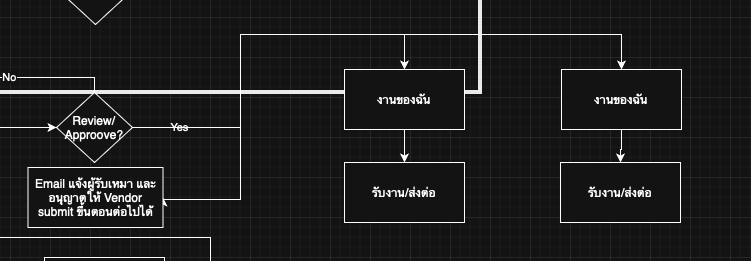
Location: My Tasks > Safety Officer / Workspace Owner
Requirements Needed
| Question | Context |
|---|---|
| 1. Task Creation Trigger | When are SO/Area tasks created? On project approval? |
| 2. Task Actions | What actions can SO/Area perform? Accept/Forward/Reject? |
| 3. Forward Target | Who can SO/Area forward to? Other users with same role? |
| 4. Project Update | How does forwarding update the project's SO/Area fields? |
| 5. Notification | Should forwarded user receive notification? |
Related to
- #159 (Email notification - completed)
- #132 (Ownership change)