Service Report #006
Date: 2026-01-08 (Updated: 2026-01-20)
Feature Overview
Features originate from the following Minutes of Meetings:
- MoM 2026-01-06 - Items 1, 2, 3, 4, 5, 6, 7, 8, 11, 12, 14, 15, 16, 17
1. Training NoShow Status
Issue: #223 Thai Name: เพิ่มสถานะ "ไม่มา" สำหรับการอบรม
Description: Add "Did not attend" (NoShow) status to training management. Safety Officers can mark workers who were enrolled in training sessions but did not attend. This status differs from "Cancelled" which indicates the enrollment was withdrawn before the training date.
Location: Tools > กำหนดค่า > จัดการการอบรม > อนุมัติผลการอบรม
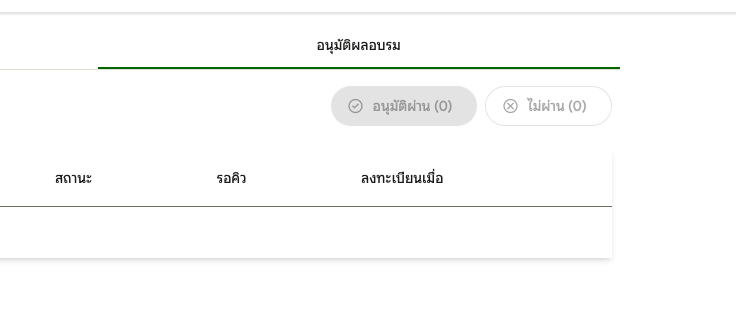
Attendance Status Flow
Status Definitions
| Status | Thai Name | Description |
|---|---|---|
| Enrolled | ลงทะเบียนแล้ว | Initial state after enrollment |
| Confirmed | ยืนยันแล้ว | Safety Officer confirmed attendance |
| Attended | เข้าอบรมแล้ว | Worker checked in on training day |
| Passed | ผ่าน | Completed training successfully |
| Failed | ไม่ผ่าน | Did not pass training |
| NoShow | ไม่มา | Did not attend (new status) |
| Cancelled | ยกเลิก | Enrollment cancelled before training |
Role Matrix
| Action | Admin | Safety Officer | Contractor |
|---|---|---|---|
| View attendance status | ✅ (readonly) | ✅ | Own workers |
| Mark as NoShow | ❌ | ✅ | ❌ |
| Filter by NoShow status | ❌ | ✅ | ❌ |
What to Test
| # | Test Case | Status |
|---|---|---|
| 1 | Safety Officer: Mark enrolled worker as "ไม่มา" (NoShow) | ✅ Tested |
| 2 | Safety Officer: Filter attendances by "ไม่มา" status (without selecting session) | ✅ Tested |
| 3 | Safety Officer: Filter attendances by "ไม่มา" status (with session selected) | ✅ Tested |
| 4 | Worker re-enrollment: NoShow workers can be enrolled in new sessions | ⌛ Pending |
| 5 | Person status unchanged: NoShow does not update Person.TrainingStatus | ⌛ Pending |
Technical Implementation
Backend Changes
New Endpoint: POST /api/training-approvals/search
- Search attendances with optional filters: status, sessionId, contractorId
- Supports "Pending" filter (Enrolled, Confirmed, Attended)
- Supports status-specific filters (Passed, Failed, NoShow)
Files Modified:
| File | Change |
|---|---|
ITrainingApprovalService.cs | Added SearchAttendancesAsync method |
TrainingApprovalService.cs | Implemented search with multi-filter support |
SearchAttendancesEndpoint.cs | New endpoint for search functionality |
Frontend Changes
Filter Enhancement:
- Status dropdown now triggers search endpoint for all status types
- Session and Contractor dropdowns show "ทั้งหมด" when All is selected
- Date format follows Thai Buddhist calendar pattern
Files Modified:
| File | Change |
|---|---|
training-setting.contract.ts | Added SearchAttendancesRequest/Response types |
training-setting.service.ts | Added searchAttendances method with rxResource |
training-approval-dashboard.component.ts | Updated filter logic to use search endpoint |
Bug Fixes Included
| Issue | Description | Fix |
|---|---|---|
| Empty results on NoShow filter | Filtering by "ไม่มา" showed empty even when records exist | Created search endpoint that doesn't require session selection |
| Dropdown blank display | Session/Contractor dropdowns showed blank for "All" | Changed to show "ทั้งหมด" like status dropdown |
| Date format inconsistency | Session dropdown showed ISO format (2026-01-06) | Applied ThaiDatePipe for Buddhist calendar format |
| Empty string GUID error | Empty sessionId string caused 400 Bad Request | Convert empty strings to undefined before API call |
2. Rename Training Schedule to Plan
Issue: #224 Thai Name: เปลี่ยนชื่อ "ตารางอบรม" เป็น "แผนการอบรม"
Description: Rename "Training Schedule" to "Training Plan" throughout the training management interface. This is a terminology change to better reflect the nature of training plans.
Location: Tools > กำหนดค่า > จัดการการอบรม
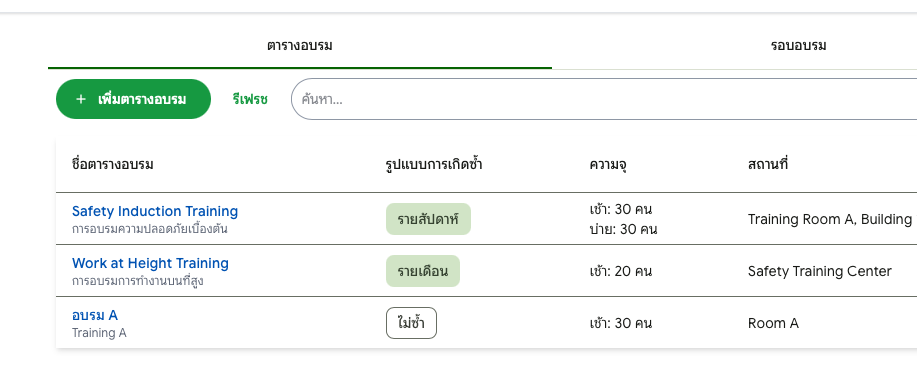

Terminology Changes
| Original (TH) | New (TH) | Original (EN) | New (EN) |
|---|---|---|---|
| ตารางอบรม | แผนการอบรม | Training Schedule | Training Plan |
| เพิ่มตารางอบรม | เพิ่มแผนการอบรม | Add Schedule | Add Plan |
| ชื่อตารางอบรม | ชื่อแผนการอบรม | Schedule Name | Plan Name |
| ข้อมูลตารางอบรม | ข้อมูลแผนการอบรม | Schedule Information | Plan Information |
What to Test
| # | Test Case | Status |
|---|---|---|
| 1 | First tab shows "แผนการอบรม" instead of "ตารางอบรม" | ⌛ Pending |
| 2 | Add button shows "เพิ่มแผนการอบรม" | ⌛ Pending |
| 3 | Form title shows "ข้อมูลแผนการอบรม" | ⌛ Pending |
| 4 | Delete confirmation shows "ยืนยันการลบแผนการอบรม" | ⌛ Pending |
| 5 | Session list "Plan" column header updated | ⌛ Pending |
Files Modified
| File | Change |
|---|---|
training-schedule-list-toolbar.component.ts | Updated add button text |
training-schedule-list.component.ts | Updated table header |
training-schedule-form.component.ts | Updated form title and field labels |
training-session-list.component.ts | Updated schedule column header |
training-setting.component.ts | Updated tab label and delete confirmation |
messages.json | Updated 7 Thai locale entries |
messages.en.json | Updated 7 English locale entries |
3. Non-repeat Training Plan Fix
Issue: #225 Thai Name: แผนการอบรมแบบ "ไม่ซ้ำ" ไม่สร้างรอบอบรม
Description: Bug fix for training plans with "None" recurrence type. When creating sessions for a non-repeating training plan, no sessions were generated.
Location: Tools > กำหนดค่า > จัดการการอบรม > แผนการอบรม
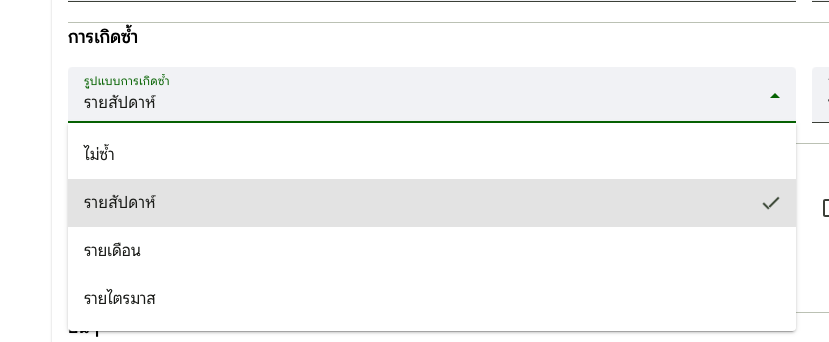
Root Cause
- Backend:
GenerateDates()method returned empty list for "None" recurrence type - Frontend: rxResource status overwrites caused form view to reset during background data fetches
Fix Applied
| Layer | File | Change |
|---|---|---|
| Backend | TrainingScheduleService.cs | Fixed GenerateDates() to return single date for "None" recurrence |
| Frontend | training-setting.service.ts | Added _isEditingMode signal to prevent rxResource status overwrites |
| Frontend | training-setting.service.ts | Added guards in rxResource streams to preserve edit state |
What to Test
| # | Test Case | Status |
|---|---|---|
| 1 | Create Training Plan with recurrence = "ไม่ซ้ำ" (None) | ⌛ Pending |
| 2 | Save the plan and click "สร้างรอบอบรม" | ⌛ Pending |
| 3 | Select date range and verify sessions are created | ⌛ Pending |
| 4 | Verify snackbar shows session count | ⌛ Pending |
4. Show Session Count
Issue: #226 Thai Name: แสดงจำนวนรอบอบรมที่สร้างหลังจากสร้างเสร็จ
Description: Show the number of training sessions created in a snackbar message after generating sessions from a training plan. Previously showed generic "บันทึกสำเร็จ" message.
Location: Tools > กำหนดค่า > จัดการการอบรม > แผนการอบรม > สร้างรอบอบรม
Before/After
| Before | After |
|---|---|
| Generic "บันทึกสำเร็จ" message | "สร้างรอบอบรมจำนวน X รายการ" |
What to Test
| # | Test Case | Status |
|---|---|---|
| 1 | Generate sessions → verify count shown in snackbar | ✅ Tested |
| 2 | Generate 0 sessions → verify "0 รายการ" shown | ⌛ Pending |
Files Modified
| File | Change |
|---|---|
training-setting.service.ts | Added _sessionsCreatedCount signal, capture from response |
training-setting.component.ts | Display count in snackbar using $localize |
messages.json | Added settings.training.sessionsCreatedMessage |
messages.en.json | Added English translation |
5. First Day of Week Configuration
Issue: #227 Thai Name: กำหนดวันเริ่มต้นสัปดาห์ (จันทร์/อาทิตย์)
Description: Make the first day of week configurable between Sunday and Monday. This setting is controlled by System Administrators through a new System Settings page.
Location: Tools > กำหนดค่า > ตั้งค่าระบบ
Changes Summary
| Change | Description |
|---|---|
| System Settings | New settings page (ตั้งค่าระบบ) for system-wide configuration |
| Business Settings | Renamed from Employer Settings (ตั้งค่าบริษัท → ตั้งค่าธุรกิจ) |
| Regional Settings | Moved from Business Settings to System Settings |
| First day of week | Radio buttons to select Sunday (0) or Monday (1) |
| Toast position | Moved to bottom center for better visibility |
First Day of Week Options
| Value | Thai | English | Description |
|---|---|---|---|
| 0 | วันอาทิตย์ | Sunday | Week starts on Sunday (default) |
| 1 | วันจันทร์ | Monday | Week starts on Monday |
Components Affected
| Component | Behavior |
|---|---|
| DatePicker | Calendar shows week starting on configured day |
| Training Calendar | Week view starts on configured day |
| All date range pickers | Respects the setting |
What to Test
| # | Test Case | Status |
|---|---|---|
| 1 | Open System Settings and verify radio buttons for first day of week | ⌛ Pending |
| 2 | Select "วันจันทร์" (Monday) and save | ⌛ Pending |
| 3 | Open any DatePicker and verify calendar starts on Monday | ⌛ Pending |
| 4 | Open Training Calendar and verify week starts on Monday | ⌛ Pending |
| 5 | Verify Business Settings has 3 tabs (no Regional) | ⌛ Pending |
| 6 | Verify toast notifications appear at bottom center | ⌛ Pending |
Files Modified
Backend
| File | Change |
|---|---|
GlobalSetting.cs | Added FirstDayOfWeek property (int) |
GlobalSettingDto.cs | Added FirstDayOfWeek property |
GetGlobalSettingEndpoint.cs | New endpoint: GET /api/settings/global |
SaveGlobalSettingEndpoint.cs | New endpoint: POST /api/settings/global |
| Seed data files | Relocated to SafetyApp.Infrastructure/Seeds/Data/ |
Frontend
| File | Change |
|---|---|
system-setting.component.ts | New System Settings page |
system-setting-form-regional.component.ts | Regional settings form with first day of week |
global-setting.service.ts | New service for system-wide settings |
global-setting.model.ts | Added firstDayOfWeek property |
thai-buddhist-date-adapter.ts | Reads first day of week from GlobalSettingService |
training-session-calendar.component.ts | Respects first day of week setting |
employer-setting.component.ts | Refactored with sticky toolbar, removed GlobalSetting |
toast.component.ts | Changed position to bottom center |
messages.json / messages.en.json | Added system settings i18n keys |
6. Date Picker Off-by-One Fix
Issue: #228 Thai Name: แก้ไขวันที่ลบหนึ่งเมื่อแก้ไขรอบอบรม
Description: Bug fix for date picker showing one day earlier when editing training sessions. When selecting a date (e.g., Jan 12), the saved value would be one day earlier (Jan 11).
Location: Tools > กำหนดค่า > จัดการการอบรม > รอบอบรม
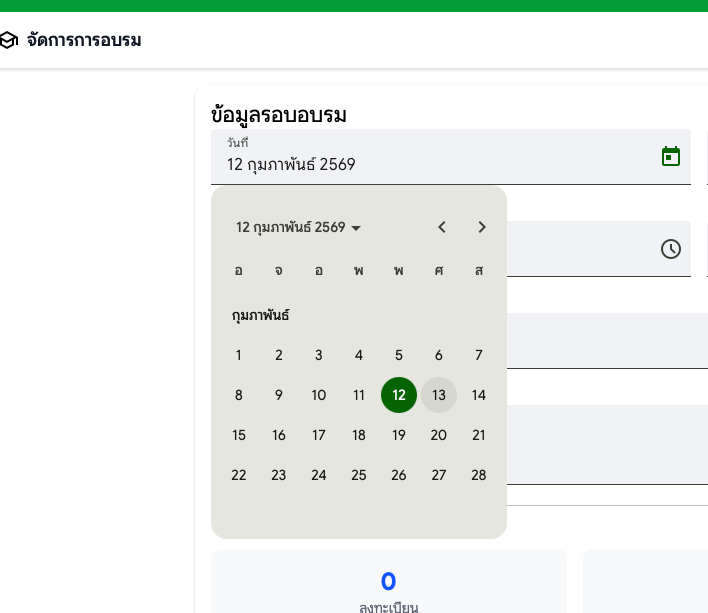

Root Cause
Using toISOString().split('T')[0] to format dates converts the Date object to UTC string. In positive timezone regions like Asia/Bangkok (+07:00), this causes dates to shift backward by one day.
// ❌ BUG: Converts to UTC, loses a day in +07:00 timezone
private formatDate(date: Date): string {
  return date.toISOString().split('T')[0];
}
// User selects: Jan 12, 2026 00:00 local time
// toISOString(): "2026-01-11T17:00:00.000Z" (UTC)
// Result: "2026-01-11" ← WRONG!
Fix Applied
| Layer | File | Change |
|---|---|---|
| Frontend | training-session-form.component.ts | Fixed formatDate() to use local date methods |
| Frontend | training-session-list-toolbar.component.ts | Fixed parseDate() and formatDate() |
| Frontend | dialog-generate-sessions.component.ts | Fixed formatDate() |
| Frontend | dialog-approve-training.component.ts | Fixed formatDate() |
| Docs | angular.md | Added "Date String Formatting (Golden Rule)" |
Correct Implementation
// ✅ CORRECT: Uses local date components
private formatDate(date: Date | null): string {
  if (!date) return '';
  const year = date.getFullYear();
  const month = String(date.getMonth() + 1).padStart(2, '0');
  const day = String(date.getDate()).padStart(2, '0');
  return `${year}-${month}-${day}`;
}
What to Test
| # | Test Case | Status |
|---|---|---|
| 1 | Edit existing training session, change date, verify correct date is saved | ⌛ Pending |
| 2 | Create new training session via "Generate Sessions", verify dates are correct | ⌛ Pending |
| 3 | Approve training with expiry date, verify correct date is saved | ⌛ Pending |
| 4 | Date filter in session list toolbar works correctly | ⌛ Pending |
7. Back Button with Unsaved Changes Confirm
Issue: #229 Thai Name: เปลี่ยน "ยกเลิก" เป็น "กลับ" พร้อมยืนยันเมื่อมีการแก้ไข
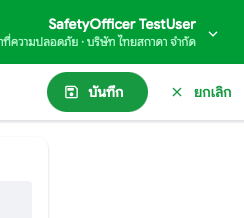
Description: Change the "ยกเลิก" (Cancel) button to "ย้อนกลับ" (Back) in training settings forms. When there are unsaved changes, show a confirmation dialog before navigating away.
Location: Tools > กำหนดค่า > จัดการการอบรม > แผนการอบรม/รอบอบรม
Problem
The "ยกเลิก" (Cancel) button was confusing because:
- Users thought it might cancel the training session itself
- Changes were discarded silently without confirmation
Fix Applied
| Layer | File | Change |
|---|---|---|
| Frontend | training-setting.component.ts | Changed button text/icon, added formDirty signal, implemented goBack() |
| Frontend | training-schedule-form.component.ts | Added formDirty model, markDirty() method on all inputs |
| Frontend | training-session-form.component.ts | Added formDirty model, markDirty() method on all inputs |
| Frontend | messages.json | Added common.unsavedChangesWarning |
| Frontend | messages.en.json | Added common.unsavedChangesWarning |
What to Test
| # | Test Case | Status |
|---|---|---|
| 1 | Edit training plan, make changes, click "ย้อนกลับ" → confirmation dialog appears | ✅ Tested |
| 2 | Click "ยกเลิก" in dialog → stays on form | ✅ Tested |
| 3 | Click "ตกลง" in dialog → goes back to list | ✅ Tested |
| 4 | Edit without making changes, click "ย้อนกลับ" → goes back immediately | ✅ Tested |
8. Move Search to Training Sessions
Issue: #230 Thai Name: ย้ายการค้นหาจากแผนการอบรมไปรอบอบรม
Description: Move the search functionality from Training Plan (แผนการอบรม) tab to Training Sessions (รอบอบรม) tab. Training plans are few in number so search is unnecessary there, but searching sessions by schedule name, nickname, or location is useful.
Location: Tools > กำหนดค่า > จัดการการอบรม > รอบอบรม

Before/After
| Location | Before | After |
|---|---|---|
| Training Plan tab | Had search bar | No search bar |
| Training Sessions tab | No keyword search | Has search bar with keyword filter |
Search Behavior
The keyword search on Training Sessions filters by:
- Schedule name (English)
- Schedule nickname (Thai)
- Session location
What to Test
| # | Test Case | Status |
|---|---|---|
| 1 | Training Plan tab has no search bar | ✅ Tested |
| 2 | Training Sessions tab has search bar | ✅ Tested |
| 3 | Search by schedule name returns matching sessions | ✅ Tested |
| 4 | Search by nickname returns matching sessions | ✅ Tested |
| 5 | Search by location returns matching sessions | ✅ Tested |
Files Modified
| Layer | File | Change |
|---|---|---|
| Frontend | training-schedule-list-toolbar.component.ts | Removed search bar |
| Frontend | training-session-list-toolbar.component.ts | Added search bar and keyword model |
| Frontend | training-setting.component.ts | Updated bindings for keyword |
| Frontend | training-setting.contract.ts | Added keyword to SearchSessionsRequest |
| Frontend | training-approval-dashboard.component.ts | Added keyword to searchSessions call |
| Backend | SearchSessionsEndpoint.cs | Added Keyword parameter |
| Backend | ITrainingSessionService.cs | Added keyword parameter to interface |
| Backend | TrainingSessionService.cs | Implemented keyword filtering |
9. Work Owner Send Actions
Issue: #231 Thai Name: เจ้าของงานส่งไปจัดซื้อและผู้รับเหมาไม่ได้ Status: 🔍 In Review
Description: Work owner cannot send projects to purchasing or contractor, blocking workflow testing.
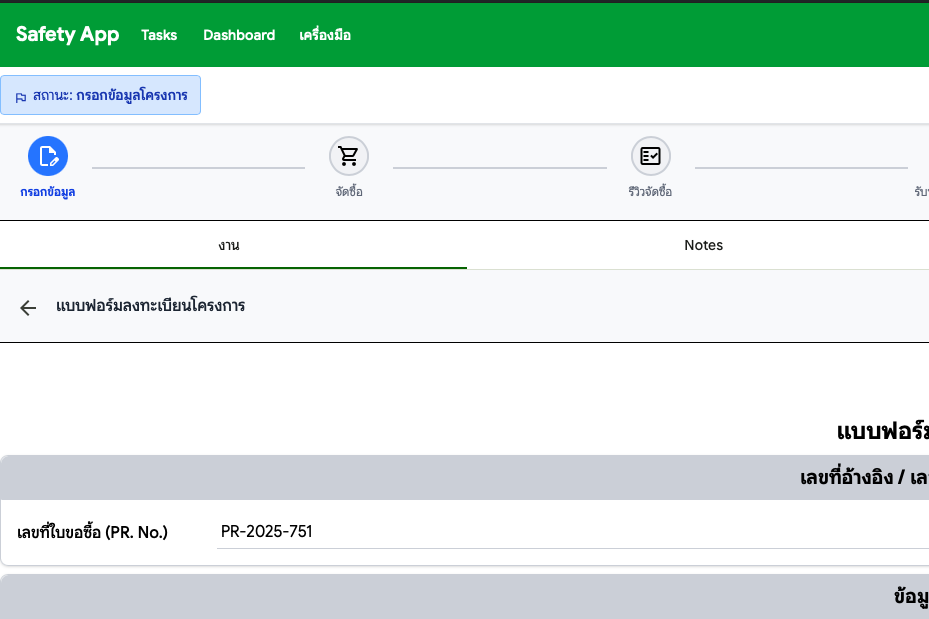
Location: Project Registration > Work Owner Actions
Resolution (2026-01-20)
Form validation with command integration enables Work Owner to send tasks to Purchasing and Contractor. The Project Registration workflow is now fully implemented and tested.
PR: #276
Deployed in: Preview29
What to Test
| # | Test Case | Status |
|---|---|---|
| 1 | Work Owner: Create project and send to Purchasing | ⌛ Pending |
| 2 | Work Owner: Create project and send to Contractor | ⌛ Pending |
| 3 | Verify workflow progresses correctly after each send action | ⌛ Pending |
10. Contractor No Projects
Issue: #232 Thai Name: ผู้รับเหมาไม่มีโครงการให้ทดสอบ flow Status: 🔍 In Review
Description: Contractor has no projects to test the workflow because work owner cannot send projects (blocked by #231).
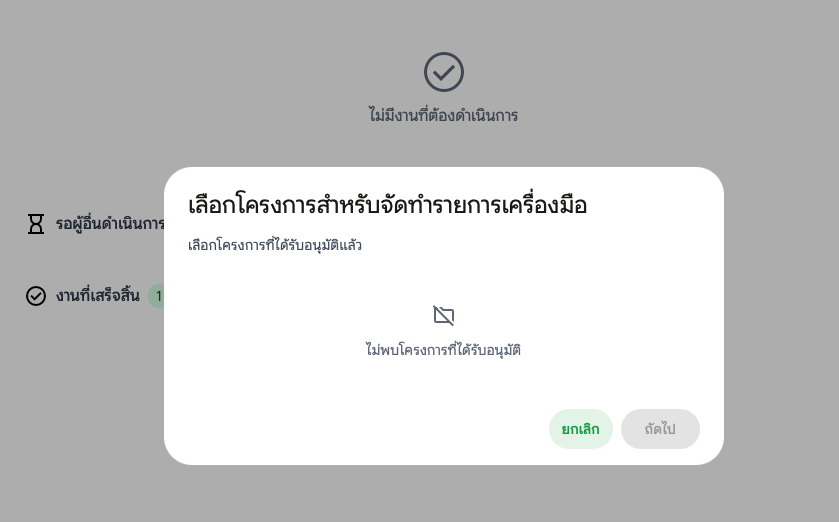
Location: Project Registration > Contractor View
Resolution (2026-01-20)
Not a bug - this was a test timing issue. The Project Registration workflow was not yet complete when testing was attempted. The workflow is now fully implemented and ready for testing.
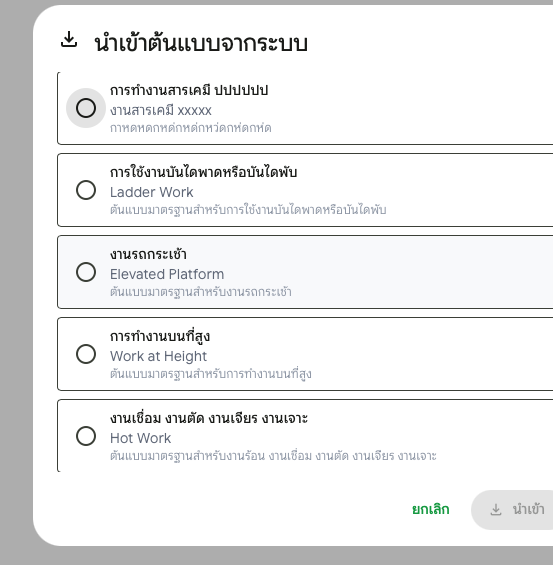
11. Hide Disabled JSA Templates
Issue: #233 Thai Name: ซ่อน JSA Template ที่ถูกปิดใช้งานจากหน้าผู้รับเหมา
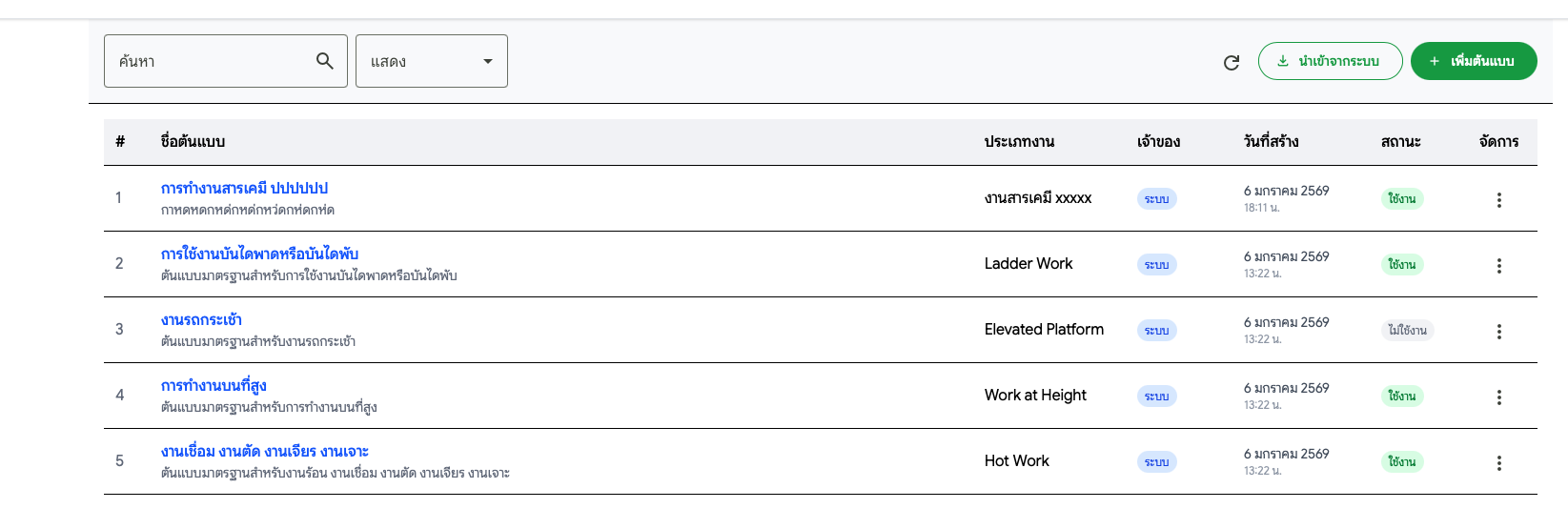
Description: JSA templates that are disabled by the system admin should not appear in the contractor's JSA Request form. Previously, disabled templates were still visible in the dropdown.
Location: Contractor > JSA Request > Select JSA Template
Root Cause
The GetJsaTemplateByContractor endpoint was not filtering by the IsEnabled flag when returning available JSA templates.
Fix Applied
| Layer | File | Change |
|---|---|---|
| Backend | JsaTemplateService.cs | Added .Where(t => t.IsEnabled) filter to contractor query |
What to Test
| # | Test Case | Status |
|---|---|---|
| 1 | Disable a JSA template in System Settings | ⌛ Pending |
| 2 | Login as contractor, create JSA Request | ⌛ Pending |
| 3 | Verify disabled template is NOT shown in dropdown | ⌛ Pending |
| 4 | Re-enable template, verify it appears again | ⌛ Pending |
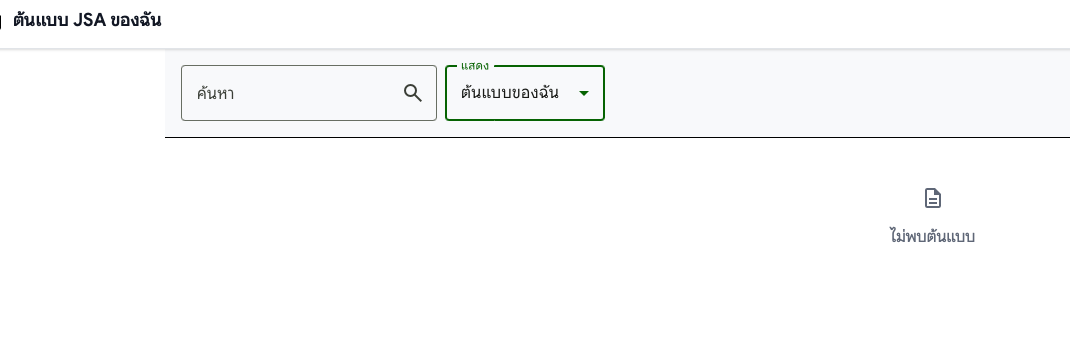
12. Hide System JSA Listing Until Imported
Issue: #234 Thai Name: ไม่ต้องแสดง listing ของระบบ จนกว่าจะนำเข้าจากระบบมาเป็นของตนเอง
Description: Hide system JSA templates from the contractor's view until they import them. Also added source tracking to show which templates were imported from the system, duplicate import warning badges, and improved success toast notifications.
Location: Tools > กำหนดค่า > JSA Template (Contractor view)
Implemented Features
| Feature | Description |
|---|---|
| Source Tracking | Shows "นำเข้าจากระบบ" badge for templates imported from system |
| Duplicate Warning | Amber badge in import dialog for already-imported templates |
| Green Toast | Success toast notification uses green color (not black) |
| Batch Import | Import multiple system templates at once via checkbox selection |
Root Cause
The original implementation showed all system templates in the contractor's JSA list, even those they hadn't imported. This made it confusing for contractors to distinguish between their own templates and system templates.
Fix Applied
| Layer | File | Change |
|---|---|---|
| Backend | JsaTemplate.cs | Added SourceTemplateId field for tracking import source |
| Backend | JsaTemplateService.cs | Set SourceTemplateId when importing, include SourceTemplate in queries |
| Backend | JsaTemplateDto.cs | Added SourceTemplateId and SourceTemplateName fields |
| Backend | JsaTemplateMapper.cs | Map source template fields |
| Backend | CheckImportedTemplatesEndpoint.cs | New endpoint to check which templates are already imported |
| Backend | BatchImportJsaTemplateEndpoint.cs | New endpoint for batch import |
| Frontend | jsa-template.model.ts | Added sourceTemplateId, sourceTemplateName fields |
| Frontend | jsa-template-list.component.ts | Added purple "นำเข้าจากระบบ" badge next to template name |
| Frontend | dialog-import-template.component.ts | Added amber badge for already-imported templates |
| Frontend | jsa-template-setting.component.ts | Changed to ToastService.success() for green color |
| Database | Migration | Added source_template_id column with self-reference FK |
What to Test
| # | Test Case | Status |
|---|---|---|
| 1 | Import a system template as contractor | ⌛ Pending |
| 2 | Verify imported template shows "นำเข้าจากระบบ" badge | ⌛ Pending |
| 3 | Open import dialog again, verify imported template shows amber badge | ⌛ Pending |
| 4 | Import same template again (with warning) | ⌛ Pending |
| 5 | Verify success toast is green color | ⌛ Pending |
| 6 | Batch import multiple templates via checkbox | ⌛ Pending |
13. Contractor Flow Blocked
Issue: #235 Thai Name: ทดสอบ flow ผู้รับเหมาต่อไม่ได้ เพราะไม่มีโครงการ Status: 🔍 In Review
Description: Cannot test contractor workflow because no projects are available (consequence of #231 and #232).
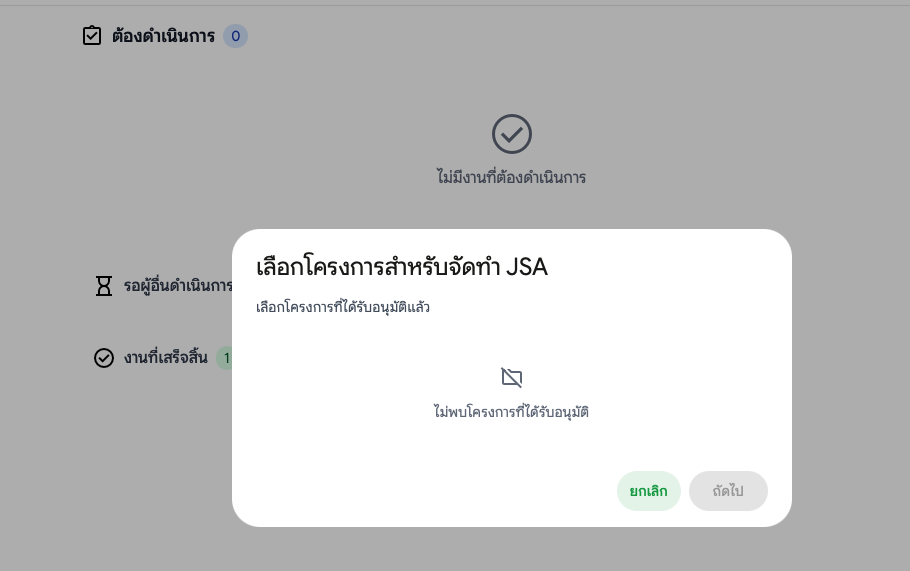
Location: Project Registration > Contractor Flow
Resolution (2026-01-20)
Not a bug - this was a test timing issue. The Project Registration workflow was not yet complete when testing was attempted. The workflow is now fully implemented and ready for testing.
14. Reports Menu Structure
Issue: #236 Thai Name: เตรียม Menu Reports จะเป็น Task Dashboard Reports
Description: Add Reports menu structure with placeholder page. This prepares the foundation for future dashboard reports (Items 15-16: Daily/Monthly dashboards).
Location: Top navigation bar > รายงาน

Implementation
| Component | Description |
|---|---|
| Navigation | Top-level "รายงาน" button between Dashboard and เครื่องมือ |
| Route | /reports with auth guard |
| Placeholder | "Coming Soon" page with analytics icon |
| Role Access | All roles except TenantAdministrator |
Files Created
| File | Description |
|---|---|
features/reports/reports.routes.ts | Route configuration |
features/reports/reports.component.ts | Placeholder component |
Files Modified
| File | Change |
|---|---|
app.routes.ts | Added /reports route |
layout-default.component.ts | Added "รายงาน" nav button |
messages.json | Added 4 Thai i18n keys |
messages.en.json | Added 4 English i18n keys |
What to Test
| # | Test Case | Status |
|---|---|---|
| 1 | Login as Safety Officer → Verify "รายงาน" button in navbar | ⌛ Pending |
| 2 | Click "รายงาน" → Navigate to /reports | ⌛ Pending |
| 3 | Verify "Coming Soon" placeholder displays | ⌛ Pending |
| 4 | Login as TenantAdmin → "รายงาน" button hidden | ⌛ Pending |
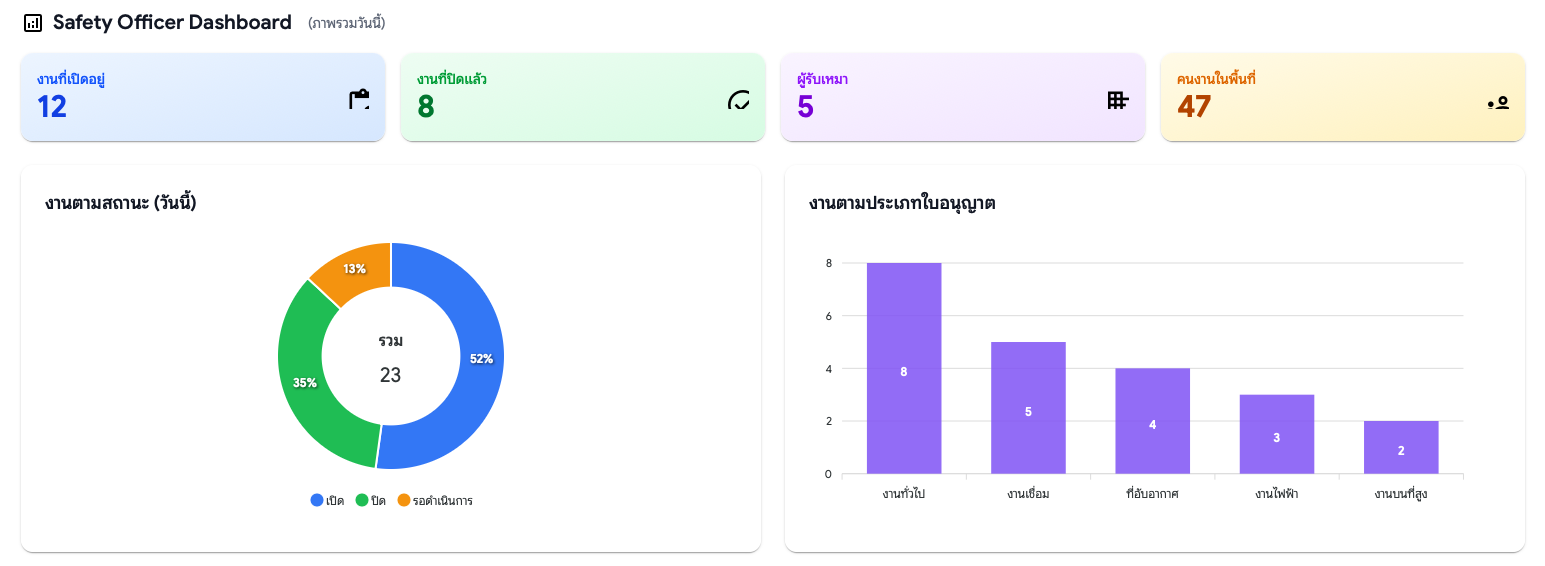
15. Dashboard WP Status Chart
Issue: #237 Thai Name: แดชบอร์ดแสดงสถานะใบอนุญาตทำงาน (WP)
Description: Add WP Status Chart to Safety Officer Dashboard with daily/weekly toggle view. Shows work permit status breakdown with proper color interpretation.
Location: Dashboard (Safety Officer role only)
Status Colors
| Status | Thai | Color | Hex |
|---|---|---|---|
| รออนุมัติ | Awaiting Approval | Orange | #f59e0b |
| เปิด | Open/Approved | Blue | #3b82f6 |
| ปิด | Closed/Completed | Green | #22c55e |
View Modes
| Mode | Chart Type | Description |
|---|---|---|
| วันนี้ (Daily) | Donut Chart | Today's WP status breakdown |
| 7 วัน (Weekly) | Grouped Bar Chart | 7-day WP status trend |
Files Created/Modified
| File | Change |
|---|---|
dashboard/models/dashboard.models.ts | Created - Data models and color constants |
dashboard/ui/wp-status-chart.component.ts | Created - WP Status Chart component |
dashboard/ui/safety-officer-dashboard.component.ts | Modified - Integrated WP Status Chart |
locale/messages.json | Modified - Added i18n keys |
locale/messages.en.json | Modified - Added English translations |
What to Test
| # | Test Case | Status |
|---|---|---|
| 1 | Login as Safety Officer → Navigate to Dashboard | ⌛ Pending |
| 2 | Verify WP Status Chart displays with donut chart (daily view) | ⌛ Pending |
| 3 | Click "7 วัน" toggle → Verify grouped bar chart displays | ⌛ Pending |
| 4 | Verify colors: Orange (รออนุมัติ), Blue (เปิด), Green (ปิด) | ⌛ Pending |
| 5 | Verify date range displays correctly in Thai Buddhist calendar | ⌛ Pending |
16. Monthly Summary Chart
Issue: #238 Thai Name: แดชบอร์ดสรุปรายเดือน
Description: Add Monthly Summary Chart with stacked bar chart showing daily breakdown of WP count, contractor count, and worker count. Includes month navigation with prev/next arrows and quick-jump dropdown.
Location: Dashboard (Safety Officer role only)

Chart Series
| Series | Thai | Color | Hex |
|---|---|---|---|
| WP Count | ใบอนุญาตทำงาน | Blue | #3b82f6 |
| Contractor Count | ผู้รับเหมา | Purple | #8b5cf6 |
| Worker Count | คนงาน | Amber | #f59e0b |
Navigation Features
| Feature | Description |
|---|---|
| Previous Month | Left arrow button |
| Next Month | Right arrow button |
| Quick Jump | Dropdown with recent 12 months |
Files Created/Modified
| File | Change |
|---|---|
dashboard/models/dashboard.models.ts | Modified - Added monthly summary types |
dashboard/ui/monthly-summary-chart.component.ts | Created - Monthly Summary Chart component |
dashboard/ui/safety-officer-dashboard.component.ts | Modified - Integrated Monthly Summary Chart |
dashboard/dashboard.component.ts | Modified - Moved board toggle to Safety Board section |
locale/messages.json | Modified - Added i18n keys |
locale/messages.en.json | Modified - Added English translations |
What to Test
| # | Test Case | Status |
|---|---|---|
| 1 | Login as Safety Officer → Navigate to Dashboard | ⌛ Pending |
| 2 | Verify Monthly Summary Chart displays stacked bar chart | ⌛ Pending |
| 3 | Click left arrow → Navigate to previous month | ⌛ Pending |
| 4 | Click right arrow → Navigate to next month | ⌛ Pending |
| 5 | Use dropdown → Quick jump to specific month | ⌛ Pending |
| 6 | Verify Thai Buddhist year display (e.g., มกราคม 2569) | ⌛ Pending |
| 7 | Verify summary totals below chart | ⌛ Pending |
17. Capacity Dropdown
Issue: #239 Thai Name: ให้กำหนดความจุได้ มีค่า default หรือเลือกจากรายการ
Description: Add capacity dropdown with preset options (10, 20, 30, 40, 50 คน) to training session and schedule forms. Also includes "กำหนดเอง" (Custom) option for manual input.
Location: Tools > กำหนดค่า > จัดการการอบรม > แผนการอบรม/รอบอบรม
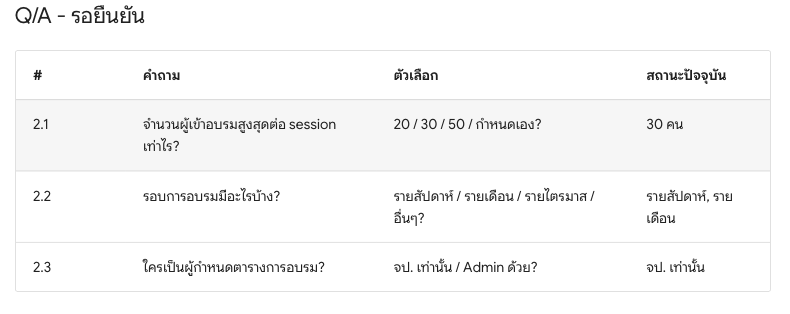
Features
| Feature | Description |
|---|---|
| Preset Options | Dropdown with 10, 20, 30, 40, 50 คน |
| Custom Input | "กำหนดเอง" option shows manual input field |
| Default Value | 30 คน (pre-selected) |
| Batch Sessions | Uses schedule capacity when generating sessions |
Files Modified
| File | Change |
|---|---|
training-session-form.component.ts | Added capacity dropdown with custom option |
training-schedule-form.component.ts | Added morning/afternoon capacity dropdowns |
What to Test
| # | Test Case | Status |
|---|---|---|
| 1 | Create new training session → default 30 selected | ⌛ Pending |
| 2 | Select preset value (e.g., 20) → capacity updates | ⌛ Pending |
| 3 | Select "กำหนดเอง" → custom input appears | ⌛ Pending |
| 4 | Type custom value → saves correctly | ⌛ Pending |
| 5 | Edit schedule → morning/afternoon dropdowns work | ⌛ Pending |
| 6 | Generate sessions → uses schedule capacity values | ⌛ Pending |
The following items are improvements initiated internally by the development team. They do not have associated MoM items or GitHub issues.
Internal Improvements
18. Training Info for Contractors
Source: Internal Request Thai Name: สร้างหน้าข้อมูลการอบรมสำหรับผู้รับเหมา
Description: Created a dedicated read-only Training Info page for contractors. This separates the contractor's view from the admin Training Settings, providing a cleaner UX with only relevant features (view sessions, filter, export).
Location: Tools > ข้อมูลการอบรม (Contractor only)
Features
| Feature | Description |
|---|---|
| Sessions List | Read-only table of training sessions |
| Calendar View | Toggle between list and calendar view |
| Filters | Filter by date range, status, schedule, keyword |
| Export | Export to XLSX and PDF |
Menu Card Visibility
| Role | Card | Route |
|---|---|---|
| Admin/Safety Officer | จัดการการอบรม (Training Settings) | /tools/settings/training |
| Contractor | ข้อมูลการอบรม (Training Info) | /tools/training-info |
Files Created
Backend:
| File | Description |
|---|---|
Features/TrainingInfo/SearchInfoSessionsEndpoint.cs | Search training sessions |
Features/TrainingInfo/GetInfoSchedulesEndpoint.cs | Get schedules for filter dropdown |
Features/TrainingInfo/ExportInfoXlsxEndpoint.cs | Export to XLSX |
Features/TrainingInfo/ExportInfoPdfEndpoint.cs | Export to PDF |
Frontend:
| File | Description |
|---|---|
training-info/training-info.component.ts | Main component |
training-info/training-info.service.ts | State management |
training-info/training-info.contract.ts | Type definitions |
training-info/ui/training-info-toolbar.component.ts | Filters and actions |
training-info/ui/training-info-list.component.ts | Sessions table |
training-info/ui/training-info-calendar.component.ts | Calendar view |
Cleanup
Removed all isContractor() logic from Training Settings component, simplifying the codebase.
What to Test
| # | Test Case | Status |
|---|---|---|
| 1 | Login as Contractor → Go to Tools | ⌛ Pending |
| 2 | Verify "ข้อมูลการอบรม" card visible, "จัดการการอบรม" hidden | ⌛ Pending |
| 3 | Click Training Info → Verify sessions list loads | ⌛ Pending |
| 4 | Test filters (date, status, schedule, keyword) | ⌛ Pending |
| 5 | Toggle to calendar view | ⌛ Pending |
| 6 | Export to XLSX and PDF | ⌛ Pending |
| 7 | Login as Admin → Verify Training Settings works without contractor logic | ⌛ Pending |
19. Status Column i18n Fix
Source: Internal Request Thai Name: แก้ไขคอลัมน์สถานะแสดงเป็นภาษาอังกฤษ
Description: Fixed the status column in Training Info list showing English text ("Open", "Full") instead of Thai ("เปิดรับสมัคร", "เต็ม").
Location: Tools > ข้อมูลการอบรม > Sessions List
Root Cause
The component was displaying session.statusName directly from the backend response (English) instead of using the frontend getSessionStatusName() translation function.
Fix Applied
| File | Change |
|---|---|
training-info-list.component.ts | Import getSessionStatusName, add getStatusName() method, use in template |
Status Translations
| English | Thai |
|---|---|
| Open | เปิดรับสมัคร |
| Full | เต็ม |
| Closed | ปิดรับสมัคร |
| Completed | เสร็จสิ้น |
| Cancelled | ยกเลิก |
What to Test
| # | Test Case | Status |
|---|---|---|
| 1 | View Training Info as Contractor | ✅ Tested |
| 2 | Verify status column shows Thai text | ✅ Tested |