Work Permit Workflow
Last Updated: 2026-03-04 Status: Core lifecycle implemented. Structural changes blocked — needs business domain input.
The dev team has zero domain knowledge about real-world Permit to Work (PTW) operations. Unlike previous workflows where we could iterate (implement → tester feedback → fix), the Work Permit involves safety-critical business rules that cannot be guessed:
- How does the daily permit cycle actually work on the plant floor?
- What signatures are needed, by whom, and when?
- What happens when a permit type changes the rules (Hot Work vs Confined Space)?
- When and how does a project-level job close?
6 design decisions are blocked — see Open Questions.
Next step: Requirements workshop with a Safety Officer or PTW administrator from a real plant. Use the Requirements Clarification Questionnaire to collect answers.
Full Lifecycle
Daily Operation Cycle
- Each permit = one day, with its own WP number and audit trail
- Closed permits cannot reopen — a new permit is created the next day
- Close Job (#509) for project-level closure is not yet implemented
Co-Review Pattern
| Co-Review State | Reviewers | Required | Next State |
|---|---|---|---|
| Co-Review | SO + WO + WAO | 3 of 3 | Work In Progress |
| Extension Review | SO + WO | 2 of 2 | Work In Progress |
| Request Close | SO + WO + WAO | 3 of 3 | Approved (Closed) |
- Request Change at any co-review → clears all approvals, sends back
- Commands are list-view only — reviewers approve from the task list
Quick Reference
Roles
| Role | Thai | Key Actions |
|---|---|---|
| Contractor | ผู้รับเหมา | Fill, extend, close |
| Safety Officer (SO) | จป. | Co-review, approve extension/close |
| Work Owner (WO) | เจ้าของงาน | Co-review, approve extension/close |
| Area Owner (WAO) | เจ้าของพื้นที่ | Co-review, approve close |
States
| State | Thai | Who | Editable? |
|---|---|---|---|
| Fill In Permit Request | กรอกใบขออนุญาต | Contractor | Yes |
| Co-Review | ตรวจสอบร่วม | SO + WO + WAO | Locked |
| Work In Progress | กำลังปฏิบัติงาน | Contractor | Locked |
| Extension Review | ตรวจสอบการขยายเวลา | SO + WO | Locked |
| Request Close | รอปิดงาน | SO + WO + WAO | Locked |
| Approved / Rejected / Cancelled | — | — | Locked |
Commands
| Command | Thai | Available In | Assigns To |
|---|---|---|---|
| Submit Permit Request | ส่งใบขออนุญาต | Fill In | SO + WO + WAO |
| Cancel | ยกเลิก | Fill In | — |
| Approve Permit | อนุมัติใบขออนุญาต | Co-Review | Next reviewer |
| Request Change | ส่งกลับแก้ไข | Co-Review, Req Close | Contractor |
| Reject Permit | ปฏิเสธใบขออนุญาต | Co-Review | — |
| Request Extension | ขอขยายเวลา | Work In Progress | SO + WO |
| Approve Extension | อนุมัติขยายเวลา | Extension Review | Next reviewer |
| Reject Extension | ปฏิเสธขยายเวลา | Extension Review | — |
| Request Close | ขอปิดงาน | Work In Progress | SO + WO + WAO |
| Approve Close | อนุมัติปิดงาน | Req Close | Next reviewer |
Email Notifications
| Trigger | Recipient |
|---|---|
| All 3 approve permit | Contractor |
| Reject permit | Contractor |
| Cancel permit | Contractor |
| Work started | Safety Officer |
| All 3 approve close | Contractor |
Prerequisite Workflows
- Project Registration must be Approved
- JSA and Tool List shown as read-only reference documents
Permit Types
8 legacy types (built-in):
| ID | Type | Thai |
|---|---|---|
| 13 | General Work | ใบอนุญาตปฏิบัติงานทั่วไป |
| 8 | Work at Height | ใบอนุญาตปฏิบัติงานในที่สูง |
| 11 | Hot Work | ใบอนุญาตงานเชื่อม/ตัด |
| 12 | Confined Space | ใบอนุญาตงานในที่อับอากาศ |
| 9 | Chemical | ใบอนุญาตงานกับวัตถุอันตรายหรือสารเคมี |
| 10 | High Voltage | ใบอนุญาตปฏิบัติงานไฟฟ้าแรงสูง |
| 14 | Radiation | ใบอนุญาตงานรังสี |
| 15 | Excavation | ใบอนุญาตงานขุดเจาะ |
Template-based (ID 1000+): Admin-configurable via Work Permit Template Setting.
Form Structure (5 Parts)
| Part | Title | Key Fields | Who Fills |
|---|---|---|---|
| 1 | Permit Details & Workers | Project info (read-only), permit number, dates, work location, supervisor, worker table, work description, PPE checklist, JSA selection | Contractor |
| 2 | Client Safety Check | Type-specific checklist (6-11 items), Pass/Fail/N/A per item + remarks | Reviewer |
| 3 | Work Authorization | Date + time range, 4 signatures (Contractor, Supervisor, SO, Area Owner) | All parties |
| 4 | Extension Request | Extension cards (date, original→new time, reason, 4 signatures, status badge) | Contractor + reviewers |
| 5 | Work Completion | Inspection date/inspector, 6 inspection categories, work acceptance, remarks, 4 signatures | Contractor + reviewers |
Current: 3 phases x 4 signatures = 12 slots. Paper form: 3 simple signatures. See gap #4.
Reviewer/inspector section removed per MoM 2026-02-27.
Paper Form Reference
Three sample paper PTW forms were analyzed. Download: Vendor Evaluation Form II
| Form | Color | Code | Image |
|---|---|---|---|
| Clearance Work Permit | Yellow | RW-F06-01 | 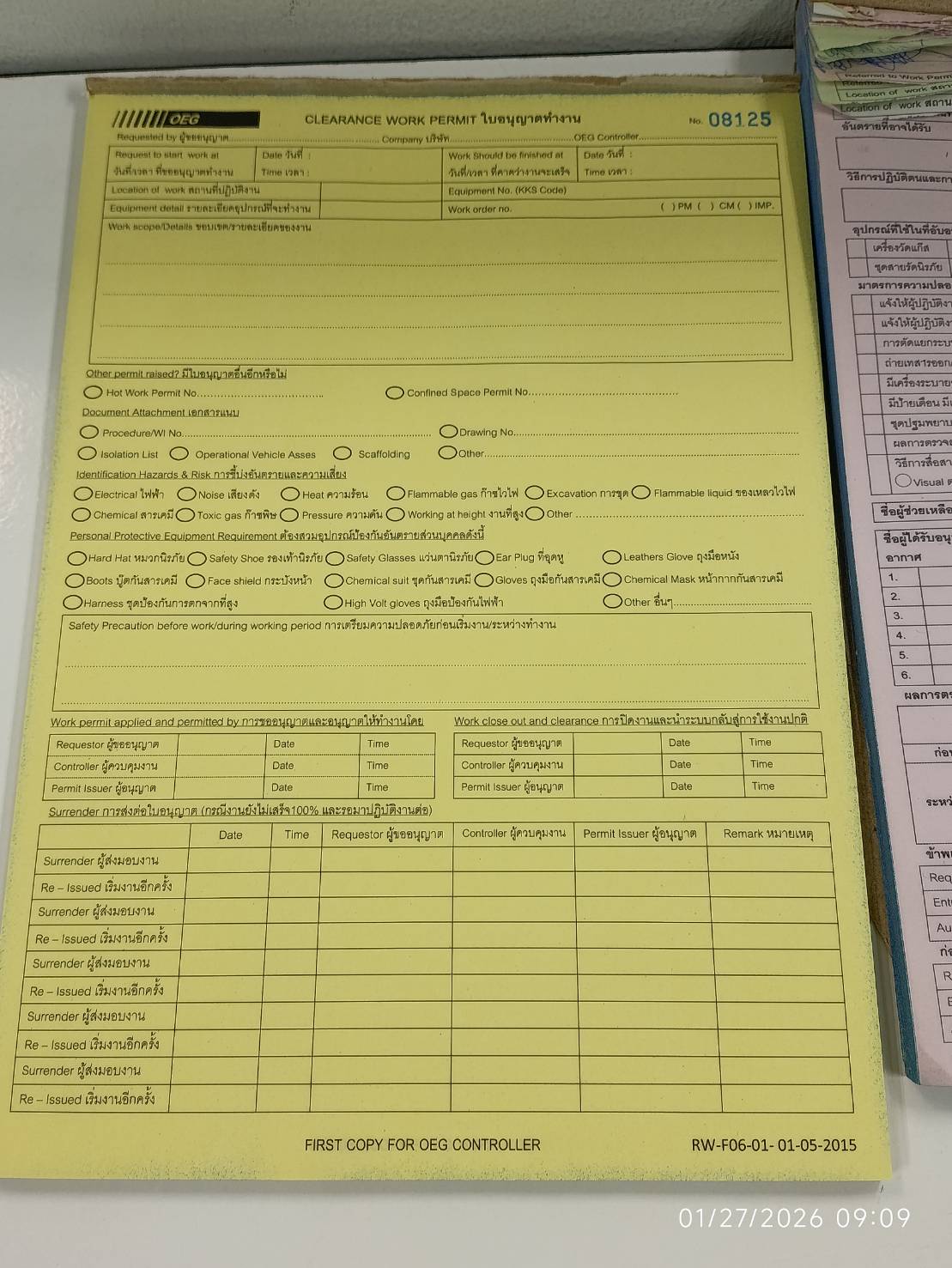 |
| Confined Space Entry | Pink | RW-F06-03 | 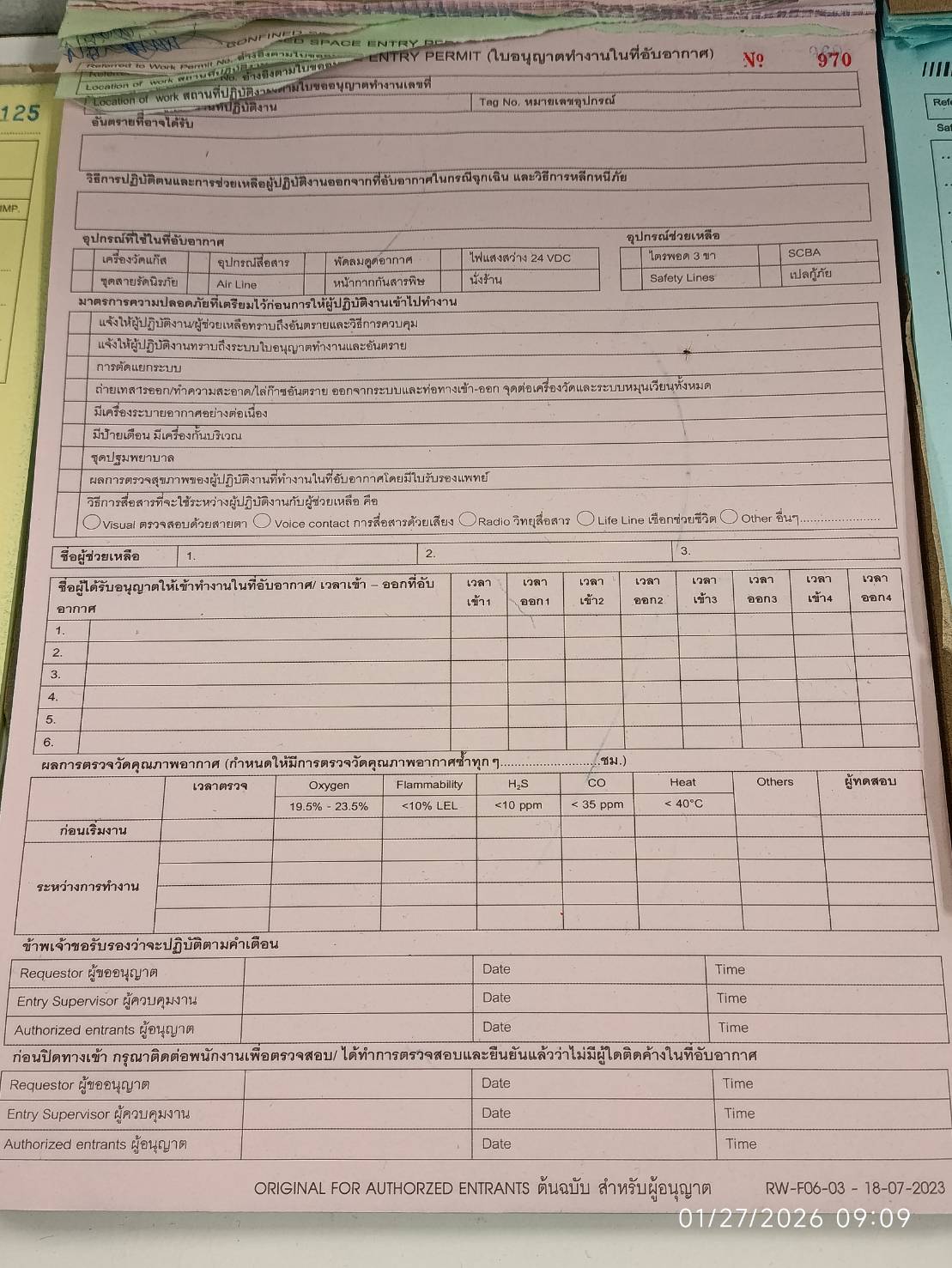 |
| Hot Work Permit | Green | RW-F06-02 | 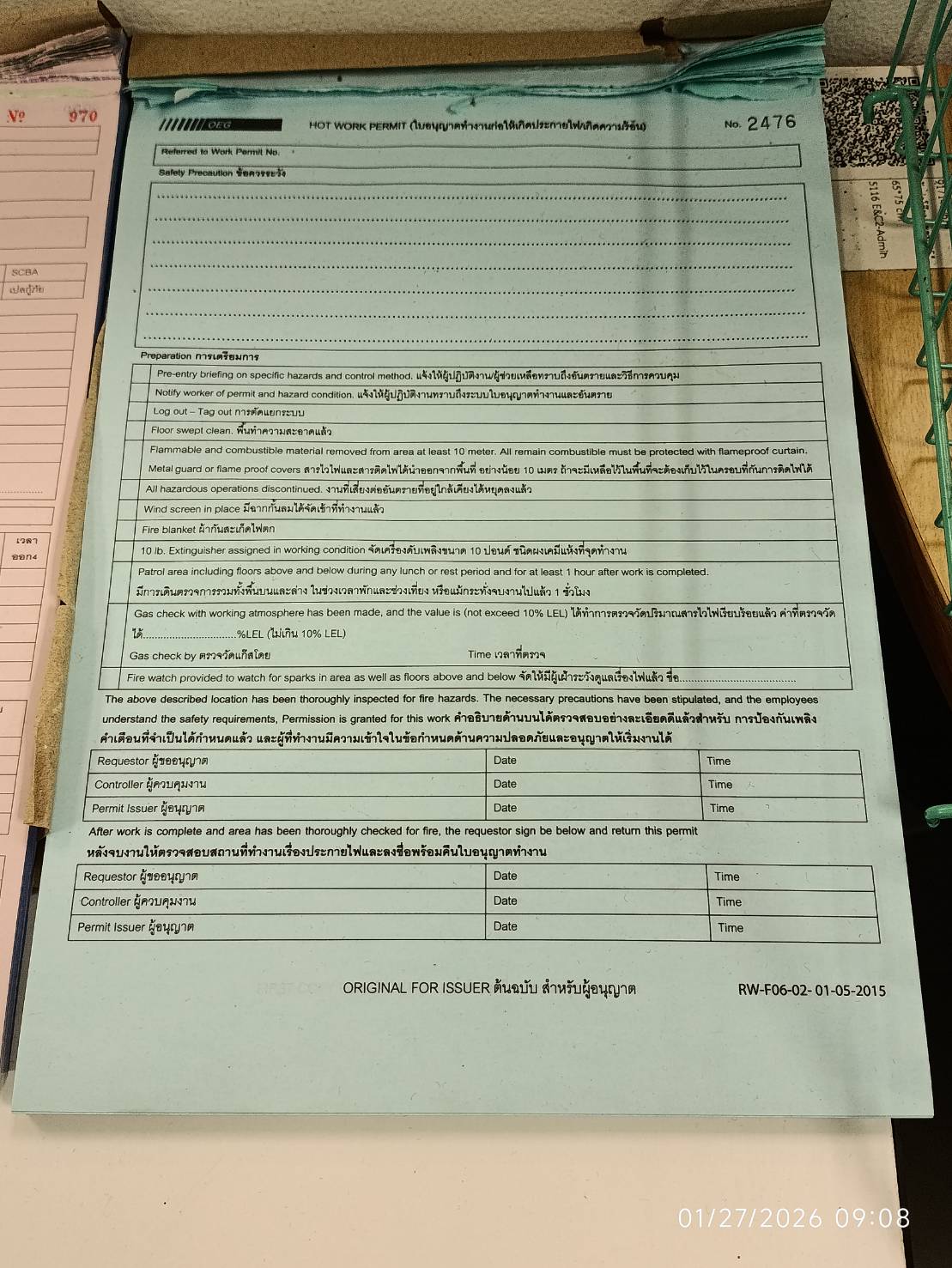 |
Common Structure
All paper forms share: permit number, company name, date+time (start/end), work location, hazard ID, PPE checklist, safety checklist, 3 authorization signatures (Requestor / Controller / Permit Issuer), close-out signatures.
Type-specific additions:
- Clearance only: surrender/re-issue table (time-stamped)
- Confined Space only: worker entry/exit time log (up to 6 workers)
Original Digital Template
Starting point for the codebase (General Work Permit, converted from DOCX). All 8 permit types follow this 5-part structure.
| Part | View |
|---|---|
| 1 | Contractor — permit details, workers, PPE |
| 2 | Client Check — safety checklist |
| 3 | Authorization — 3-phase sign-off |
| 4 | Extension — time extension |
| 5 | Completion — close-out inspection |
Paper vs Digital — Gap Analysis
| # | Finding | Paper Form | Digital (Current) | Priority | Issue |
|---|---|---|---|---|---|
✅ Fixed — ptw-permit-details renders startDateTime and endDateTime | — | ||||
| 2 | Worker entry/exit time | Confined Space only | Not implemented | P3 | — |
✅ Fixed — checklist supports Pass/Fail/N/A ('na' value) | — | ||||
| 4 | Authorization too complex | 3 signatures, 1 entry | 3 phases x 4 sigs = 12 slots | P1 | #506 |
| 5 | Signature role mismatch | Requestor/Controller/Permit Issuer | Contractor/Supervisor/SO/Area Owner | P2 | #506 |
| 6 | Extension co-review roles | — | SO + WO only (need WAO?) | P2 | #508 |
| 7 | Generic completion categories | Type-specific close-out items | Same 6 categories for all types | P3 | — |
| 8 | No project-level "Close Job" | Paper has project close-out | Daily WP closure only | P2 | #509 |
| 9 | No backend signature validation | Signatures required before work | Backend approves without checking if signatures exist | P1 | — |
| 10 | Extension form stub | Extension fields on paper | Backend model ExtensionRequestForm has zero fields | P2 | — |
Original Design Diagrams (Draft)
These are draft designs from draw.io — includes unbuilt phases (Prerequisites, Evaluation). Reference only.
| Diagram | Status |
|---|---|
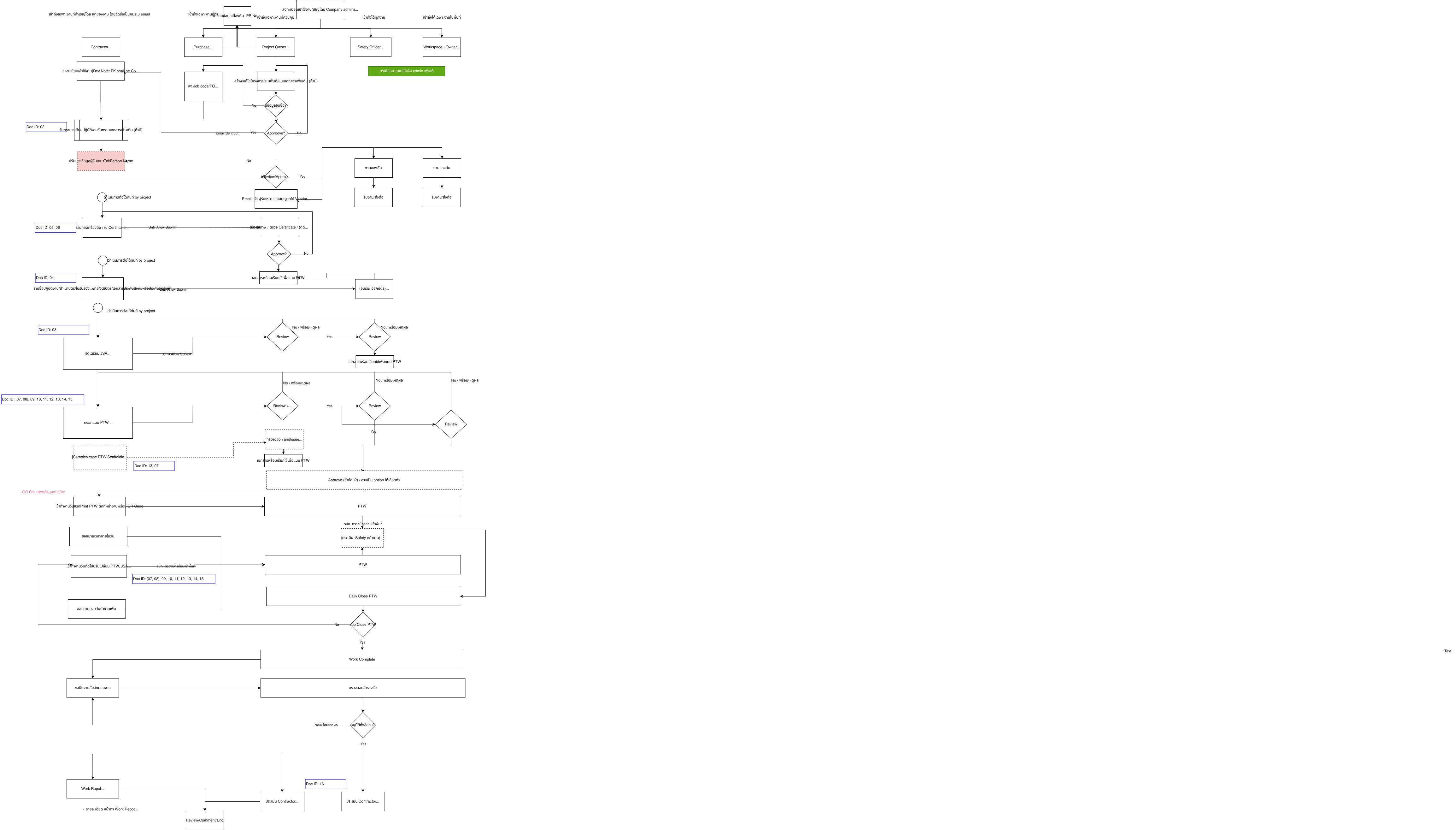 | Prerequisites → check only, PTW Fill → implemented, Co-Review → implemented, Execution → implemented, Evaluation → not built |
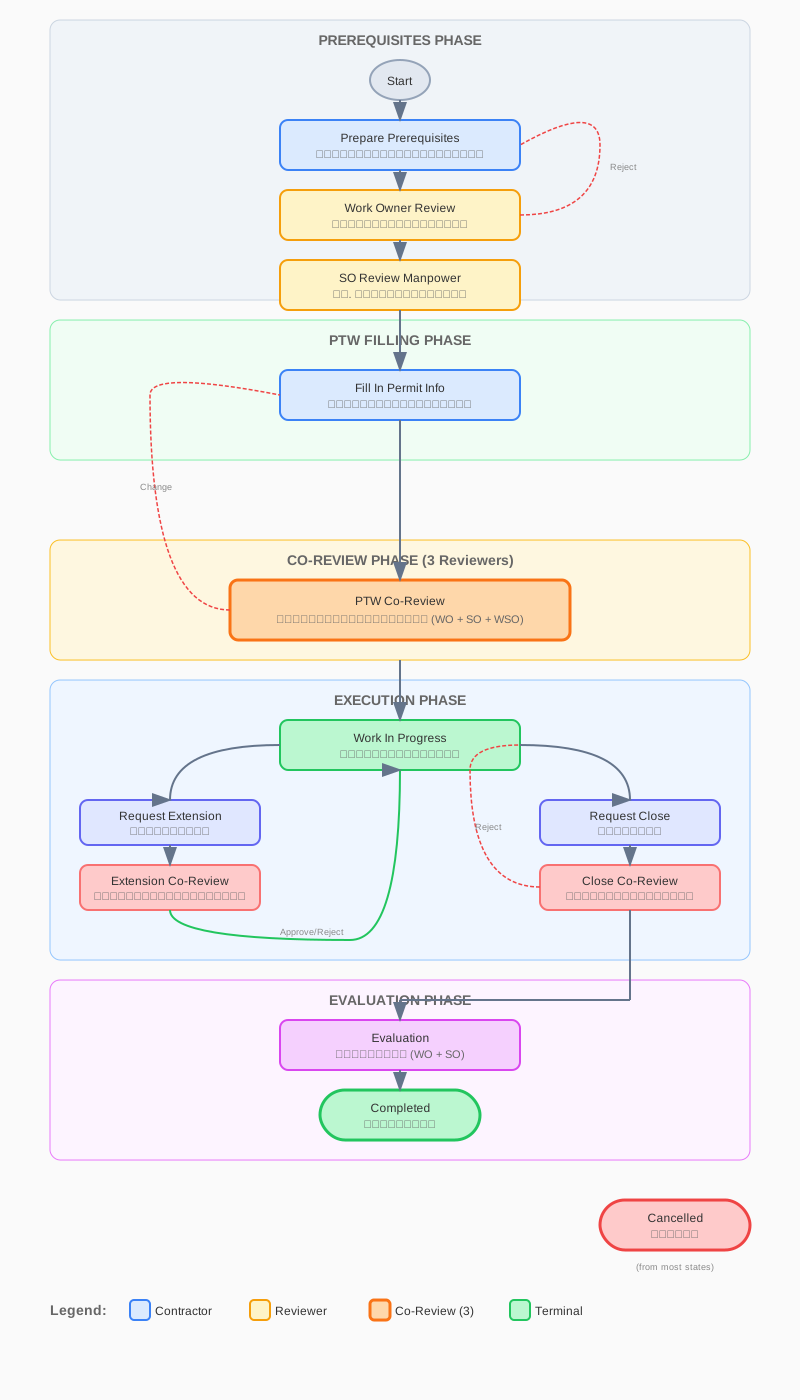 | Simplified dev view |
 | All workflows |
Source: frontend/src/assets/workflows/ and docs/static/img/diagrams/
Open Questions (Blocked)
6 design decisions require business domain expert input. Full details and fill-in questionnaire: Requirements Clarification.
| # | Question | Priority | Issue |
|---|---|---|---|
| 1 | Daily close/reopen — new WP each day? reuse? shift-based? | P1 | — |
| 2 | Authorization — who are the 3 signers? how many phases? | P1 | #506 |
| 3 | Extension vs surrender/re-issue — same concept? who reviews? | P2 | #508 |
| 4 | Close Job (project-level) — who closes? prerequisites? | P2 | #509 |
| 5 | Evaluation phase — when? who? what form? | Future | — |
| 6 | Permit type variations — what's different per type? | P3 | — |
Issue Tracker
MoM 2026-02-27
| # | Item | Issue | Status |
|---|---|---|---|
| 2 | Trained workers popup | #503 | ✅ |
| 4 | Remove inspector from Part 2 | #505 | ✅ |
| 5 | Simplify authorization | #506 | 🚧 Blocked |
| 6 | Validate extension/closure data | #507 | ✅ |
| 7 | Extension + close co-review | #508 | 🚧 Blocked |
| 8 | Close Job menu | #509 | 🚧 Blocked |
| 9 | Disable cancel on approved | #510 | ✅ |
Related Issues (SR12)
| Issue | Title | Status |
|---|---|---|
| #309 | WP Workflow Testing | ⌛ Pending |
| #161 | Permit Type Selection Flow | Partially done |
| #162 | Missing Tabs (Tools, JSA, Project Info) | Done (reference docs) |
| #163 | Trained Worker Selection → #503 | 🔍 Done |
| #164 | JSA Tab with Tick Marks | ⌛ Pending |
| #165 | Form Verification vs Paper → This doc | ⌛ Pending |
| #191 | Daily Closure Rules → #509 | 🚧 Blocked |
| #338 | System Isolate Checkbox | ⌛ Pending |
Roadmap
| Phase | Items | Status |
|---|---|---|
| Done | #510 cancel removal, #505 inspector removal, #503 trained workers, #507 validation | ✅ |
| Next (blocked) | #506 Part 3 authorization, gap #1 date-time render, #508 extension roles | 🚧 |
| Backlog (blocked) | #509 Close Job, type-specific completion, entry/exit log, N/A option | 🚧 |
| Future | Evaluation phase (SO + WO), Vendor Evaluation Form II | Not designed |
Tester Checklist
Basics
- Create work permit from approved project
- Pre-populated project data (PO, dates, contractor, location)
- Reference documents visible (Project Reg, JSA, Tool List)
- Auto-save works on all parts
- Permit type selection works (legacy + template)
Fill & Submit
- Add workers from trained worker registry popup
- PPE checkbox grid works
- JSA document selection works
- Submit sends to SO + WO + WAO simultaneously
Co-Review
- All 3 reviewers see permit (read-only)
- Each can approve independently, task reassigns to next
- All 3 approve → Work In Progress + email to contractor
- Request Change → clears approvals, back to contractor
- Reject → Rejected + email
Work In Progress
- No cancel button (#510)
- "Request Extension" and "Request Close" available
- All form parts locked
Extension
- Fill Part 4 data, submit to SO + WO
- Both approve → back to Work In Progress
- Reject → back to Work In Progress
Closure
- Fill Part 5 data, submit to SO + WO + WAO
- All 3 approve → task Closed + email
- Request Change → back to Work In Progress